- Inicio
- »
- Recursos Gratuitos para Pequeñas Empresas
- »
- Herramientas empresariales gratuitas
- »
- Free Bill Generator
Free Online Bill Generator
Tired of spending countless hours int the office sending hand-written paper bills? We got you! Boost your billing process with Invoice Fly’s Online Bill Generator. Our tool lets you create instant bills in seconds that will make you look professional and get you paid fast! Save this page to your bookmarks for easy access.
Lista de artículos
How to use the free bill generator tool
Tabla de contenidos
How does an online bill generator work?
An online bill generator is a digital tool—usually accessible through a website or invoicing software—that allows individuals like freelancers, contractors and small businesses to create, customize, and send professional-looking invoices or bills without needing advanced accounting skills. It simplifies the billing process, helping you save time, reduce manual errors, and get paid fast.
Creating a bill online takes only 3 easy steps:
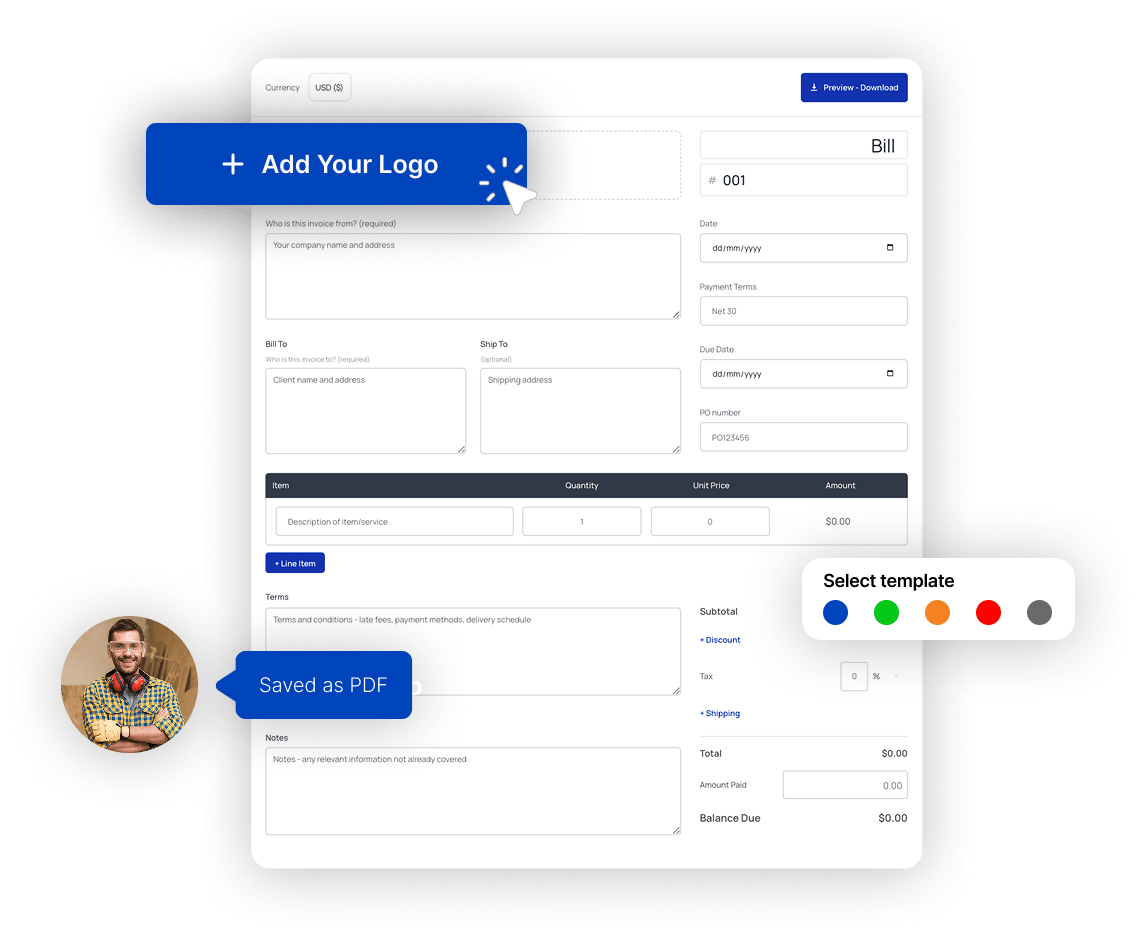

PASO 1
Access the Bill Generator
Click on the "Generate Bill Now" button.
PASO 2
Introduzca sus datos
Drop your custom brand logo and start filling in your required bill information.
PASO 3
Descargar y compartir
Now, click on the download bill button & get your bill in PDF in seconds!
How to generate a bill online?
This is a step-by-step guide that walks you through our online bill generator, helping you create perfect bills for your business by including all the key elements a professional bill must include.
The first step is to add your basic information and in the blank bill template:
- Choose the currency you want to issue the bill with. Add your bill number (for easier accounting), issue date, payment terms, due date and Purchase Order number.
- Añada el logotipo de su empresa e información comercial en el “Who is the bill for” sección.
- Incluya los datos de su cliente en el “Bill To” y añada la dirección del cliente en la sección “Ship To” si es necesario.
- Add item lines for every item (service or product) you are billing your client for. Include a description, quantity (days or hours), and price in the “Artículo” sección.
- Añada descuentos y tipos impositivos en el “Subtotal” sección. Incluya también los gastos de envío adicionales si fuera necesario.
- Incluya sus condiciones de pago y otras condiciones en el “Condiciones” sección, Añade tus métodos de pago favoritos y la dirección de facturación, tu número de PayPal o Stripe o cualquier otra herramienta de pago que utilices para tu negocio.
Bill generator sample
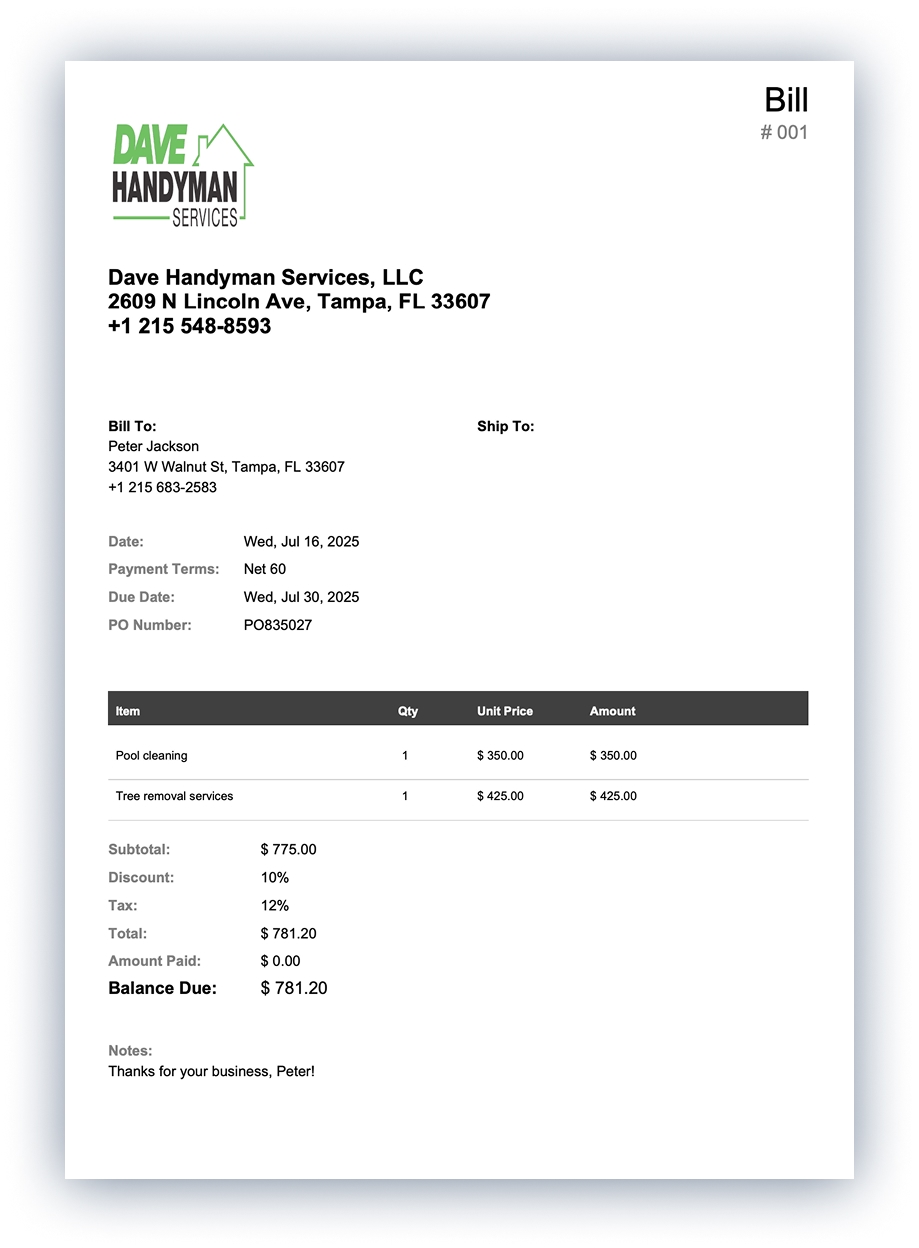
How to send your bill?
- Use Invoice Fly’s free online bill maker tool:
- Go to Invoice Fly’s Free Bill Generator page and launch the tool
- Rellene sus datos de facturación:
Introduzca la información de su empresa (nombre, dirección, logotipo) y los datos de sus clientes (nombre, dirección, contacto).
Input your bill number, issue date, due date, and payment terms.
All fields are typically labeled in the interface for easy navigation .
- Añadir partidas:
Haga clic en “Añadir elemento”.
Para cada artículo o servicio: añada la descripción, la cantidad, el precio unitario, los impuestos y los posibles descuentos.
La herramienta calcula automáticamente los totales (subtotales, impuestos, descuentos, total final)
Interfono.
- Customize the bill:
Añada o cargue su logotipo y ajuste los elementos de estilo para reflejar su marca.
Elige o ajusta plantillas para conseguir un diseño profesional.
- Vista previa y descarga:
Haga clic en “Guardar” o “Vista previa” una vez introducidos todos los datos.
Export/download your bill as a PDF directly from the tool .
- Comparte o envía:
Puede enviar por correo electrónico el PDF descargado a su cliente.
Alternatively, Invoice Fly supports sharing a direct link or via WhatsApp/social media (depending on the interface).
If using the full app version, you can also send bills and enable online payments through credit cards, PayPal, or Stripe.
- Track and automate:
- In the full Invoice Fly app (web or mobile), once sent:
- Get live notifications when customers view or pay the bill.
- Set up automatic reminders, track payment status, and receive real-time alerts.
- In the full Invoice Fly app (web or mobile), once sent:
Essential elements of a bill
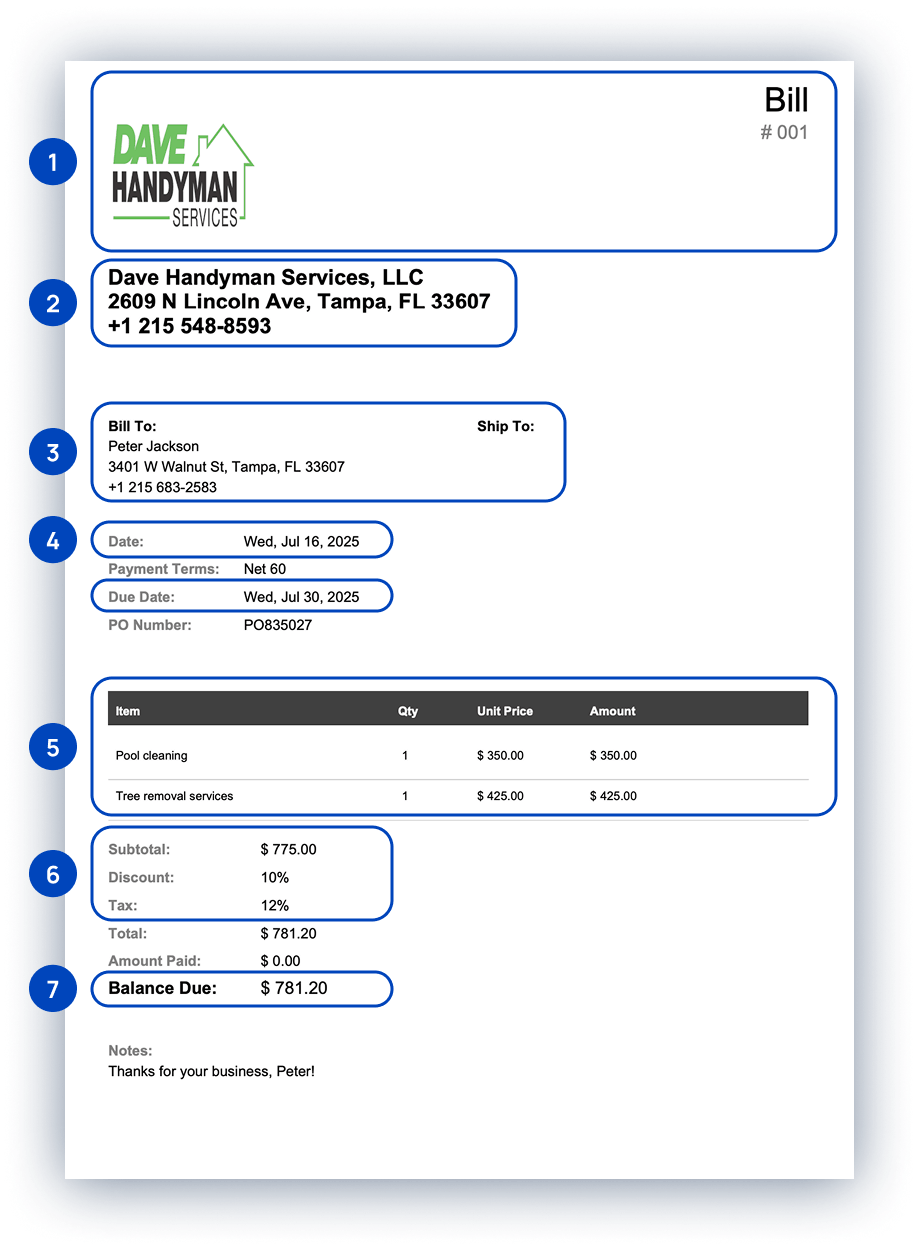
1. Cabecera
It must include your company logo and your bill number. Including the bill number makes it easy for you and your client to quickly understand what kind of document is, and it will make it easier for reviewing records or completing taxes.
Bill numbers can help keep track of multiple bills and they can be formatted in different ways. These formats include file numbers, (BILL0022), unique billing codes, or date-based purchase order numbers.
2. Company Name and Details
When creating a bill, you must include your company’s legal name and contact information. This should include your address, phone number, and email address. Typically, company information is written near the top of the bill to create a clear distinction between the company providing the goods or services and the company receiving them.
3. Client Name and Details
Clearly state your client’s name and contact information. These contact details should include an address, phone number, and email address.
4. Date, Due Date, Payment Terms & PO Number
It’s important to include the issue date for each bill. This can clear up confusion when the same client receives multiple bills. Because payment is typically due a specific number of days after receiving the bill, including the date is an important part of showing when payment is due.
Payment terms specify if the bill will be paid in 15, 30, 60 or 90 days.
The payment terms and conditions of the bill are the most frequently overlooked part. Standard payment terms may vary depending on the industry, your company’s policy, or your previous history with the client.
It is important to clearly state the consequences if either party breaches this agreement. These penalties may include late fees or additional charges.
You can also add your preferred payment method here, whether it’s check, cash, wire transfer, PayPal, or credit card.
Then, add payment instructions. For example, write your account number and bank name if customers are supposed to pay via direct transfer.
A PO number, or Purchase Order number, is a unique identifier assigned to a specific purchase order, a document that a buyer sends to a seller to request goods or services.
5. Description of Goods or Services Provided
In box five, you should include separate line items for each good or service you are providing. Each row should include the following:
- Nombre de los bienes o servicios prestados.
- Precio unitario o tarifa horaria.
- Cantidad o número de horas trabajadas.
6. Itemized Fees
A continuación, añada los impuestos, gastos de envío o tasas adicionales que se apliquen a los bienes o servicios suministrados. Recomendamos incluir estos impuestos y tasas en partidas separadas, ya que algunas empresas utilizan presupuestos internos diferentes para cubrir estas tasas.
7. Balance Due
The online bill generator will calculate the total balance due from the items you entered in boxes five and six.
What is surprising bill?
A surprising bill is an unexpected or unusually high bill that a customer or client receives—often without prior notice or clear understanding of the charges. These bills typically catch the recipient off guard because they either weren’t aware the charges would occur, didn’t agree to them, or assumed something was included in a price but later discovered hidden fees, extra services, or billing errors.
Surprising bills can happen in many contexts, such as:
- A freelancer billing extra hours that weren’t communicated.
- A medical patient receiving out-of-network charges they didn’t anticipate.
- A utility company charging unexpected fees after a rate change.
- Subscription services auto-renewing without reminder.
They can damage trust between businesses and customers, which is why it’s important for businesses to clearly outline pricing, provide quotes or estimates upfront, and communicate any changes before finalizing a bill.
Can billing be automated?
Sí, billing can be automated, and it’s one of the best ways to save time, reduce errors, and ensure timely payments—especially for small businesses, freelancers, and subscription-based services.
When you use invoicing software like Invoice Fly, you can set up automatic billing rules. This means the system can:
- Automatically generate bills/invoices on a set schedule (monthly, weekly, per project).
- Send bills to clients via email without manual input.
- Charge stored payment methods if the client agrees (common in subscriptions).
- Send payment reminders before and after the due date.
- Track bill status (sent, viewed, paid, overdue).
- Automatically apply late fees if payments are overdue (optional).
So yes—automated billing is not only possible, it’s highly recommended once your business reaches a point where manual invoicing becomes repetitive or time-consuming.
What is a mock bill?
A mock bill is a non-final, sample version of a bill or invoice that’s created for informational or preview purposes. It shows what the actual bill would look like, including estimated charges, but is not meant to be paid.
- Not legally binding and not a demand for payment.
- Often used to preview charges, test billing setups, or demonstrate bill formats.
- Includes typical billing elements: itemized services/products, prices, taxes, and total.
- Clearly labeled as “mock,” “sample,” “draft,” or “pro forma” to avoid confusion.
Common use:
- Training or demonstration: to show staff or clients how actual billing works.
- Estimates: sent to clients before finalizing a quote.
- Testing billing systems: used by developers or finance teams to verify system accuracy.
- Client onboarding: to explain expected charges or billing cycles.
A mock bill looks like a real bill but is created only for preview, practice, or explanation, not actual payment.
What is the rarest type of bill?
The rarest type of bill is likely the “pro forma invoice” when used in non-commercial or niche contexts, especially for international trade, customs declarations, or non-cash transactions. While pro forma invoices are relatively well-known in trade circles, they are rarely encountered by most small businesses or freelancers.
A pro forma invoice is not a real bill—it’s a preliminary invoice issued before a sale is finalized.
It’s commonly used for quoting prices, preparing customs documentation, or supporting funding or import license applications.
It contains all the expected billing details (items, cost, terms), but it’s not legally binding y doesn’t require payment.
Even rarer forms:
Intercompany invoices: sent between departments or branches of the same company (common in multinational corporations, but obscure elsewhere).
Zero-dollar invoices: used for record-keeping when a service is free or fully discounted but still needs documentation.
Customs invoices: Specially formatted invoices required by certain governments for importing/exporting goods—each with unique legal formatting.
While standard sales invoices and recurring invoices are common, pro forma, zero-dollar, and customs-specific invoices are rare and mostly used in specialized industries or international operations.
What is a dead bill called?
A “dead bill” typically refers to a bill (or invoice) that is no longer active, valid, or collectible—often because it’s been canceled, written off, or voided.
It can be called different names, depending on the context:
- Void Invoice: An invoice that was issued but later canceled before payment or fulfillment. It’s marked as “void” in the records to show it has no financial impact.
- Canceled Invoice: An invoice that was formally withdrawn, often because of a change in the transaction, duplicate entry, or customer request. It may be replaced by a corrected invoice.
- Written-Off Invoice / Bad Debt: If a customer never pays and the amount is deemed uncollectible, the invoice is considered a bad debt and is written off in accounting records. This is common after months of non-payment and failed collection efforts.
- Expired Invoice: Some invoices are marked as expired if they pass a certain due date or legal period for enforcement. Though technically still on file, they’re often no longer enforceable.
So, while “dead bill” isn’t a formal accounting term, depending on the reason it’s “dead,” it would likely be categorized as a void, canceled, written-off, or expired invoice. Each has specific meaning in billing or accounting systems.
What is a computer-generated bill?
A computer-generated bill is an invoice that is created automatically using software or a digital system, rather than being written or calculated manually. It’s a standard in modern billing and is widely used by businesses, service providers, and institutions.
Computer-generated bills are created using invoicing, accounting, or billing software such as Invoice Fly or point-of-sale (POS) systems. These programs pull stored data—like customer details, pricing, taxes, and product/service information—and automatically calculate totals, generate invoice numbers, and format the document for printing or emailing.
It typically includes:
- Business and customer information
- Número y fecha de la factura
- Itemized list of goods or services
- Impuestos, descuentos y tarifas
- Importe total adeudado
- Payment terms and options
Who uses computer-generated bills?
- Blue collar professionals & contractors
- Pequeñas empresas
- Retail stores generating printed receipts
- Freelancers or agencies sending PDF invoices
- Subscription businesses charging clients monthly
Online platforms auto-billing users
FAQs about Free Online Bill Maker
A bill is a formal document that outlines the amount of money a customer owes for goods or services received. It includes essential details such as the seller’s information, a breakdown of products or services, pricing, taxes, and the total amount due. Bills are used in everyday transactions—like in restaurants, utilities, retail, and freelance services—to request payment from the buyer.
When using an online bill generator, this document is created digitally and instantly, ensuring accuracy, professionalism, and consistency. A bill generator tool simplifies the billing process by allowing businesses to quickly create and send clear, itemized bills without manual calculations or templates.
Billing software is a digital tool that helps businesses create, send, and manage invoices or bills quickly and accurately. It automates the billing process by generating professional bills, calculating totals (including taxes and discounts), tracking payments, and even sending reminders to clients.
Whether you're a freelancer, small business owner, or service provider, billing software streamlines your entire payment workflow—from issuing bills to recording paid and unpaid transactions. Many billing tools also integrate with accounting systems, payment gateways (like Stripe or PayPal), and customer databases to make financial management easier and more organized.
When paired with a bill generator, billing software becomes a powerful solution for reducing manual work, minimizing errors, and getting paid faster.
A bill and an invoice are similar—but not exactly the same. Both are documents that request payment for goods or services, but they’re used in slightly different contexts.
En factura is typically used in business-to-business (B2B) or freelance settings. It’s a formal document sent by a seller or service provider to request payment, often with payment terms (like “net 30” or “due on receipt”). Invoices are tracked for accounting, taxes, and payment follow-up.
A bill, on the other hand, is more commonly used in everyday transactions—like when you pay at a restaurant or receive a utility bill. It’s usually presented at the point of sale or service and is expected to be paid immediately.
To summarize:
- Invoice: formal request for payment, often with a due date
- Bill: request for immediate payment, usually in casual or consumer settings
When using a bill generator, the terms may be used interchangeably depending on your business type, but understanding the difference helps maintain professionalism and clarity in your billing process.
No, a bill and a receipt are not the same—though they’re both used in transactions, they serve different purposes and happen at different stages of the payment process.
A bill is a request for payment. It’s issued before payment is made and lists what the customer owes for goods or services. Businesses use bills to inform customers of the total cost and ask for payment.
Example: A restaurant hands you a bill at the end of your meal showing what you owe.
A receipt is proof of payment. It’s issued after payment has been received and confirms that the customer paid the amount due. It typically includes payment details, the date, and sometimes the method of payment.
Example: After you pay the restaurant bill, they give you a receipt as confirmation.
If you’re using a bill generator, you’re creating a document to request payment—not to confirm it. Receipts are typically generated separately, once the bill has been paid.
Generating an e-bill (electronic bill) is fast, easy, and essential for modern businesses. An e-bill is a digital version of a traditional bill that can be shared via email, link, or download—no printing required.
- Choose a Bill Generator or Billing Software: Use an online bill generator like Invoice Fly, or billing software such as Zoho Invoice, QuickBooks, or Wave. These tools are designed to create professional, itemized e-bills in minutes.
- Enter Your Business Details: Add your company name, logo, address, and contact information. This builds trust and gives your e-bill a branded, professional look.
- Add Customer Information: Fill in your client’s name, email, and billing address to ensure the bill goes to the right person or department.
- List Products or Services: Include a clear breakdown of what you’re billing for: item names, quantities, rates, taxes, and any applicable discounts.
- Set Payment Terms: Define the due date, accepted payment methods (e.g., PayPal, bank transfer), and any late fees if applicable.
- Review and Generate: Double-check for accuracy. Most platforms will calculate totals for you automatically.
- Send or Download the E-Bill: You can now email it directly to the customer, share a payment link, or download it as a PDF.
If you send bills regularly, look for tools like Invoice Fly online bill maker that let you automate recurring e-bills, track payment status, and send automatic reminders.
Getting paid through bills is simple and fast—especially when you use a digital bill generator gustar Invoice Fly. Once you've created and sent a bill, your client can pay directly through the digital invoice using secure online payment methods.
With Invoice Fly, you can get your bills paid through trusted platforms like PayPal y Raya, giving your customers multiple convenient payment options, including:
- Apple Pay
- Google Pay
- Visa, Mastercard, American Express
- Klarna (Buy Now, Pay Later)
- ACH bank transfers (U.S.)
- SEPA bank transfers (EU)
After you send your bill, clients can click a “Pay Now” button and choose their preferred payment method.
This not only speeds up the payment process but also gives a seamless experience—whether your customer is on a phone, tablet, or computer.
Recursos gratuitos
Recursos para gestionar su empresa con fluidez y eficacia.


Plantillas gratuitas
Explore plantillas gratuitas y cree presupuestos, cotizaciones, facturas, recibos y facturas.

Generadores gratuitos
Generar Estimaciones, Cotizaciones, Facturas, Recibos y Proformas en línea.

Calculadoras gratuitas
Utilice nuestras calculadoras gratuitas: Precio de servicio, Margen de beneficio, Salario neto, IVA, Punto de equilibrio...

Pruebe Invoice Fly hoy mismo
- Envía presupuestos y facturas en segundos
- Recopilar pagos con tarjeta y en línea
- Recibir notificaciones instantáneas
- Gane más puestos de trabajo