
Examples of Billing Invoices: Templates, Formats & Tips for Easy Invoicing
Table of Contents
Examples of billing invoices help small businesses, freelancers, and service providers understand how to request payment clearly and professionally. A billing invoice outlines the services or products provided, itemized charges, payment terms, taxes, and the total amount due. It serves both as a payment request and an accounting record.
Well-structured billing invoices improve cash flow, reduce disputes, and support accurate bookkeeping. Whether you’re using Excel, QuickBooks, Google Sheets, or invoicing software, the format and details matter.
This guide will cover:
- What a billing invoice is and its purpose
- Common billing invoice formats
- Key components every billing invoice should include
- Practical examples of billing invoices
- How to create a billing invoice step by step
- Common billing mistakes to avoid
What Is a Billing Invoice?

A billing invoice is a formal document sent by a seller to request payment for goods or services provided. It includes detailed line items, pricing, tax calculations, and payment terms. Businesses use billing invoices to document sales, manage accounts receivable, and support tax reporting.
Definition and Purpose of a Billing Invoice
A billing invoice serves several functions:
- Requests payment from clients
- Documents sales transactions
- Tracks outstanding balances
- Supports accounting records
- Provides legal proof of services rendered
Billing invoices typically include a unique number, issue date, due date, itemized services, subtotal, tax, and total amount due. The IRS emphasizes keeping these records organized supports tax deductions, reduces audit risk, and improves financial reporting.
Common Formats for Billing Invoices
Billing invoices can be created in multiple formats depending on your business needs.
Excel Billing Invoice
Many businesses use Microsoft Excel or an Excel spreadsheet to create structured billing invoices. Excel allows custom formulas for automatic totals and tax calculations.
QuickBooks Invoice Format
Accounting software such as QuickBooks Online generates accounting invoices directly within the system. These formats integrate with bookkeeping records and payment tracking.
PDF Billing Invoice
PDF invoices are fixed documents that maintain formatting across devices. They are ideal for sending professional billing statements via email.
Word Billing Invoice
Microsoft Word templates provide flexibility in layout and branding but require manual calculations unless paired with a spreadsheet.
Google Sheets or Google Docs Format
Cloud-based formats allow collaboration and remote access but may require manual payment tracking.
Choosing the right format depends on your workflow and accounting complexity.

If you prefer automation instead of building spreadsheets manually, professional invoicing software helps you generate clean billing invoices, calculate totals automatically, track payments, and keep your branding consistent without formatting errors.
Key Components of an Effective Billing Invoice

Every effective billing invoice includes specific elements to prevent confusion and payment delays.
Business Information & Logo
Include:
- Business name
- Address
- Email and phone number
- Logo
- Tax ID (if applicable)
Clear branding increases trust and professionalism.
Billing Information
Add:
- Client name
- Client address
- Contact details
- Purchase order number if required
For reference, understanding PO numbers ensures you correctly include procurement documentation when required.
List of Products or Services
Itemize each product or service clearly. Each line item should include:
- Description
- Quantity
- Unit rate
- Line total
Payment Terms & Methods
Specify payment expectations clearly, including:
Total Amount and Taxes
Calculate:
- Subtotal
- Taxes
- Discounts
- Final total
Incorrect totals are one of the most common invoicing mistakes businesses make, and even small calculation errors can delay payment, damage credibility, and create unnecessary back-and-forth with clients.
Examples of Billing Invoices
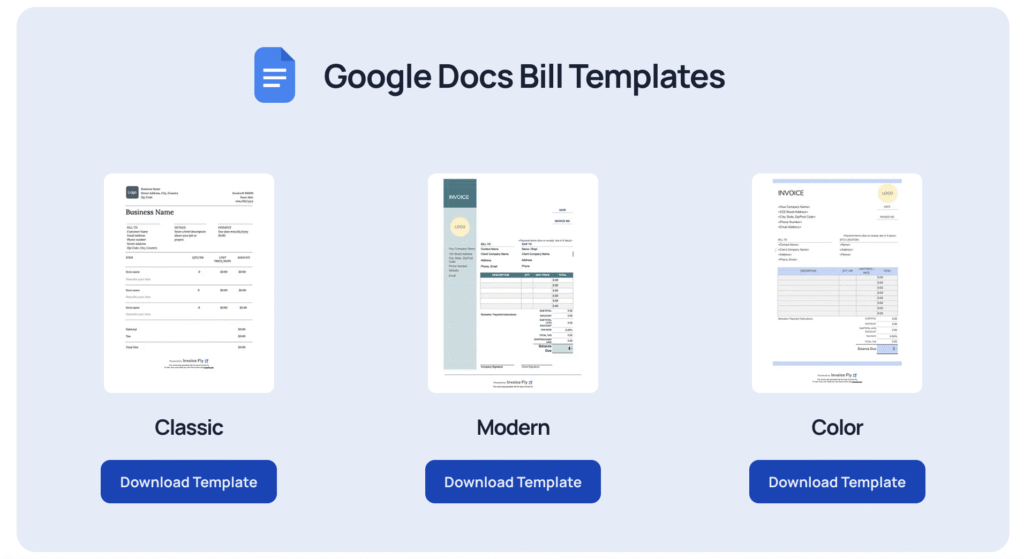
Here are practical examples of billing invoices across common formats.
Excel Bill Example
An Excel billing invoice includes:
- Header with company details
- Itemized Excel sheet with formulas
- Automatic subtotal and tax calculations
- Grand total field
Google Docs Bill Template Example
Google Docs billing statements focus on layout design. Totals are usually calculated manually unless connected to Sheets.
PDF Bill Example
PDF billing invoices are widely used for formal billing. They maintain structure across devices and prevent editing.
Word Bill Example
Word billing invoices offer design flexibility but require careful calculation review.
Google Sheet Bill Example
A Google Sheets billing invoice functions similarly to Excel but allows cloud collaboration.
Printable Billing Template
Printable billing statements are useful for in-person services or retail environments.
You can access structured free bill template layouts to simplify formatting and reduce manual errors.
If you want ready-made layouts you can customize immediately, professionally designed free bill templates help you create structured billing invoices without formatting from scratch.
How to Create a Billing Invoice
Using Billing Invoice Templates
Templates provide consistent structure and reduce the risk of missing critical details like invoice numbers, payment terms, or tax calculations. Using guidance on how to write an invoice helps you send accurate billing invoices the first time.
Using a Free Billing Invoice Generator
Using a free bill generator helps you send professional billing invoices quickly, improving response time and increasing the chances of faster payment.
Using Invoice Fly
Invoice Fly’s invoicing software automates calculations, stores client information, tracks payment status, and reduces accounting errors.
Tips for Accurate Invoicing
- Send invoices promptly
- Include clear payment terms
- Double-check totals
- Use consistent numbering
- Track billable expenses properly
Common Mistakes to Avoid on Billing Invoices
Even small errors on billing invoices can delay payment and create unnecessary friction with clients. Avoiding these common mistakes protects your cash flow and professionalism.
Missing Information
Leaving out key details is one of the fastest ways to delay payment.
Common omissions include:
- Missing invoice number
- No issue date or due date
- Incomplete client contact information
- No itemized description of services
- Missing tax breakdown
When billing details are unclear, clients may need clarification before processing payment. This slows down approval and extends your payment cycle.
Incorrect Calculations
Manual math errors are more common than many businesses realize.
Examples include:
- Incorrect line totals
- Tax miscalculations
- Discount errors
- Incorrect subtotal or grand total
Even small calculation mistakes can:
- Trigger client disputes
- Require corrected billing statements
- Damage credibility
- Delay payment processing
Using automated tools or double-checking totals before sending helps prevent these avoidable delays.
Confusing Layout
A cluttered or inconsistent format makes it harder for clients to review charges.
Common layout problems include:
- No clear separation between subtotal and total
- Overly small fonts
- Poor alignment of numbers
- Long paragraphs instead of itemized lines
- No clear payment instructions
If a client cannot quickly identify what they are being charged for, they are more likely to question or delay the invoice.
Clear formatting, consistent numbering, and professional invoice elements reduce misunderstandings and make your billing invoices easier to approve.
Simplify Billing and Get Paid Faster
Clear billing invoices protect your revenue, improve accounting accuracy, and strengthen client relationships. Whether you’re using Excel spreadsheets, QuickBooks invoices, or printable templates, consistency matters.
If you want automation, branding control, and real-time tracking, Invoice Fly’s invoicing software helps you create professional billing invoices, monitor payment status, and streamline accounting from one platform.
