Pricing and profit
Set your prices, cover your costs, and see how much each job leaves you.
- Service Price CalculatorAdd up labor, materials, and overhead to work out what to charge.
- Profit Margin CalculatorSee how much you actually make on each job after costs.
- Markup CalculatorAdd your markup to costs and find the right selling price.
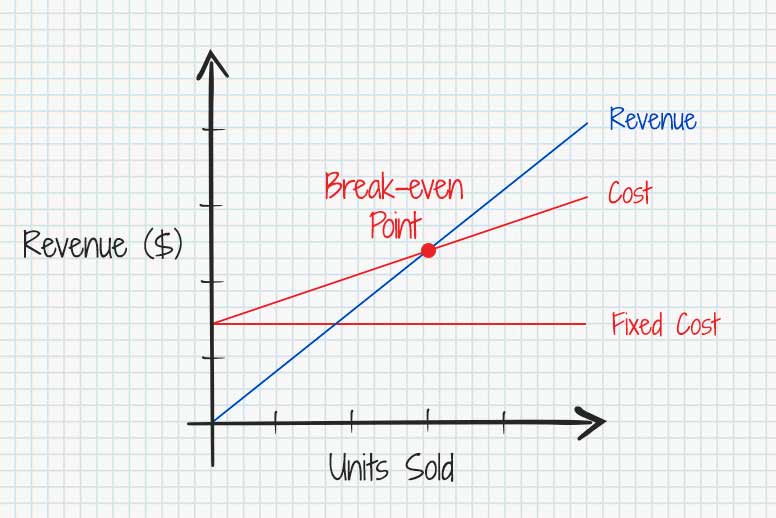
- Break-even Point CalculatorFind out how much you need to sell to cover your costs.
- ROI CalculatorSee what you’re getting back from the money you invest.
-
 Academy · 11 min readHourly or flat rate: which should you charge?
Job costs by industry
Price cleaning, lawn care, painting, roofing, and construction jobs before you send a quote.
- House Cleaning Cost CalculatorPrice cleaning jobs by home size and service.
- Lawn Care Cost CalculatorEstimate lawn care costs by yard size and service.
- Paint Cost CalculatorEstimate paint, labor, and total cost by room.
- Roofing Cost CalculatorPrice roofing jobs by roof size and materials.
- Concrete CalculatorCalculate how much concrete your project needs.
- Drywall CalculatorWork out how many panels your room needs.
Taxes
Work out sales tax, VAT, and how much to set aside for taxes.
Pay and hours
Add up work hours, check take-home pay, and turn hourly rates into yearly salaries.

Loans and assets
Check loan payments, plan a down payment, and see what your equipment costs over time.

No calculators match “”
Try a topic or an industry instead. These searches always find something:
Need a document, not a number?
Create invoices, estimates, and quotes, browse ready-made templates, or explore more free tools for your business.
- Invoice GeneratorAdd your client and job details, then download a ready-to-send PDF invoice.
- Estimate GeneratorEnter your job details and pricing, then download a PDF estimate for client approval.
- Quote GeneratorSet your price and expiry date, then download a PDF quote to send to your client.
- Free TemplatesDownload and customize invoice, estimate, quote, receipt, and other business templates in Word, Excel, PDF, Google Docs, or Google Sheets.
- Receipt GeneratorAdd the payment details and download a PDF receipt for your client.
- All Free ResourcesExplore all Invoice Fly generators, calculators, and templates in one place.
Make better business decisions with the right numbers
Explore Invoice Fly Academy guides on profit margins, job pricing, break-even points, and taxes. Learn how to work out the numbers and price your jobs with confidence.




Got your numbers? Turn them into a job.
Once you’ve worked out your price, create and send an estimate or invoice with Invoice Fly. Get client sign-offs, collect e-signatures, and accept online payments right from your phone.
Try Invoice Fly Free