Invoice Software for Small Business. Get Paid Faster.
You've done the work. Getting paid should be the easy part. Create professional invoices, manage payments, automate reminders, and stay on top of your cash flow with invoicing software built specifically for small businesses.
Why Invoice Fly Is the Best Invoicing Software for Small Business Owners
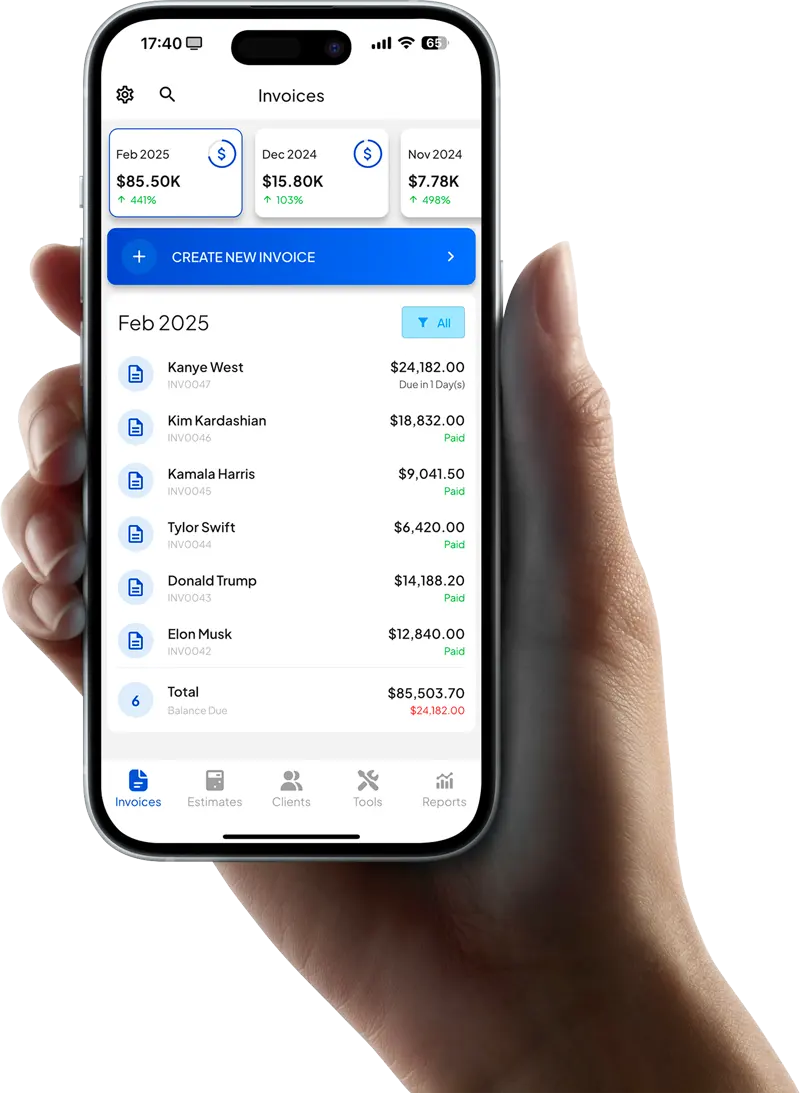
From a powerful invoice generator to complete invoice management in one dashboard, Invoice Fly gives small business owners all the tools they need to create invoices, manage payments, and stay in control of their business, without the complexity of traditional accounting software.
Create & Send Professional Invoices
Let clients pay by credit card, Apple Pay, Google Pay, ACH transfer, or PayPal. Get money into your account faster, without chasing checks or waiting on bank transfers.
Accept Online Payments Instantly
Create professional invoices in minutes with Invoice Fly's built-in invoice generator. Customize invoice templates with your logo, brand colors, and line items, then send them instantly by email or text.
Automate Reminders & Recurring Billing
Automate reminders for overdue invoices and set up recurring invoices for repeat clients. With smart invoice management built into your invoicing software, you can reduce manual follow-ups and keep payments on track.
Track Invoice Status in Real-Time
Know exactly where every invoice stands. Track paid, pending, and overdue invoices in real time, with complete visibility over payments and accounts receivable from one centralized dashboard.
The Invoicing Software American Small Businesses Trust Every Day
From Invoice to Payment in Three Simple Steps
No accounting degree required. Invoice Fly is built for small business owners, not accountants. Set up in minutes and start getting paid faster.
Create Your Invoice
Choose a professional invoice template, add your logo, line items, taxes, and payment terms, then create and send polished invoices in minutes.
Send It & Track It in Real-Time
Email or text invoices directly to clients. See exactly when they're delivered, opened, and paid, so you always know where every invoice stands.
Get Paid Instantly
Clients can pay online by card, Apple Pay, bank transfer, ACH, or PayPal. Automatic reminders follow up on overdue invoices, so you don't have to.
The Invoicing Software Built for Small Businesses, Not Accountants
Full accounting software handles payroll, tax filing, and bookkeeping. Powerful, but often more than small businesses need. Invoice Fly is a focused invoicing tool built to do one thing exceptionally well: help you get paid faster. No complicated setup, no accountant required, and no overwhelming dashboards to learn.
Custom Invoice Templates
Customize professional invoice templates with your logo, brand colors, and business details to create a polished experience for every client.Outstanding Balances at a Glance
See exactly who owes you money and how much. Track overdue invoices before they become a cash flow problem.Client Payment History
View every invoice sent, viewed, paid, and overdue in one place. Complete client payment history, whenever you need it.Invoice from Anywhere
Create and send invoices from your phone, tablet, or computer. Whether you're on the job site, in the office, or on the go, your business stays moving.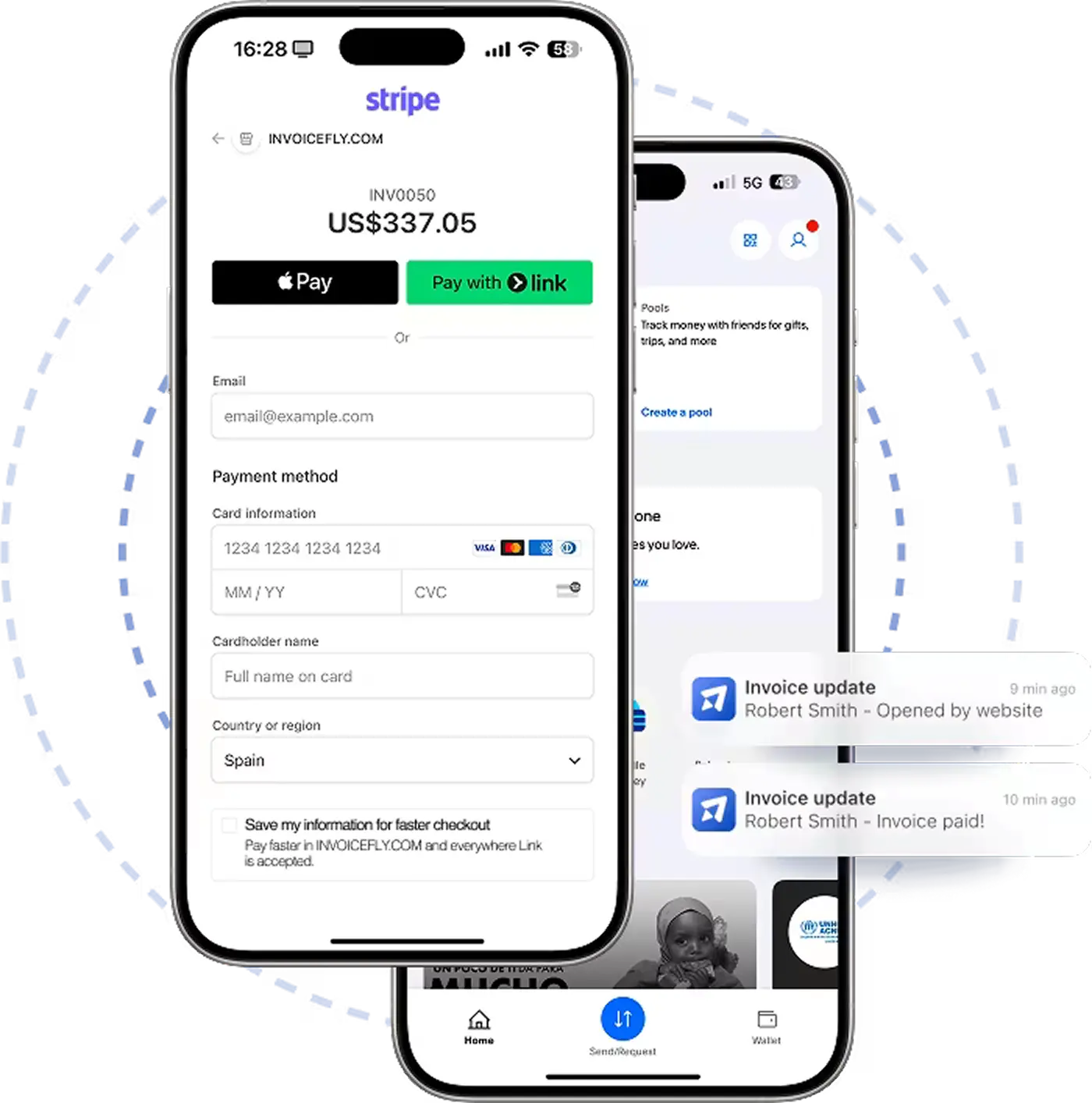
The Easier It Is to Pay, the Faster You Get Paid
Make it effortless for clients to pay the moment they receive your invoice. Offer trusted payment methods, reduce payment delays, and improve cash flow without extra work.
Start with a Professional Invoice Template. Grow with Everything Else.
From professional invoice templates and invoice examples to a complete invoice maker, Invoice Fly gives small businesses everything they need to create invoices, stay organized, and get paid faster. Start free, customize your invoices in minutes, and send them with confidence.
Start invoicing freeProfessional Invoice Templates
Choose from a library of professionally designed templates. Add your logo, brand colors, and business details to send invoices that leave a great impression every time.
Expense Tracking & Receipt Scanner
Snap a photo of any receipt and Invoice Fly automatically logs the expense. Keep your business spending organized without a single piece of paperwork.
Real-Time Business Reports
Revenue summaries, cash flow tracking, and accounts receivable aging reports — updated in real time so you always have the financial visibility to make smarter decisions.
Get Paid 3× Faster
Businesses using Invoice Fly collect payments up to 3 times faster than with traditional invoicing. Online payments and one-click checkout remove all the friction.
Instant Payment Notifications
Know the moment a client opens your invoice and the second they pay. Real-time push notifications keep you informed whether you're at your desk or on the move.
AI-Powered Logo Maker
No logo yet? Invoice Fly's built-in AI logo maker creates a professional brand mark in minutes — so your invoices always look like they came from an established business.
What small business owners say.
"I used to spend way too much time chasing late payments and keeping track of who owed what. Now everything is in one place, and the automatic reminders have made a huge difference. My clients stay on top of invoices without me having to follow up constantly."
"Setting up Invoice Fly took less than an hour. I created my invoice template, added my services, and sent my first invoice the same day. It feels like it was built specifically for small businesses that need something simple and reliable."

"Between client work and running my business, I don't have time for complicated software. Invoice Fly keeps everything organized, from invoices to payment tracking, and gives me a clear view of my cash flow at any moment."

Choose the Best Invoice Software Plan for Your Small Business
One powerful invoicing platform. Two flexible billing options. Choose the plan that works best for your business.
- Template customization
- Unlimited invoices & estimates
- Receive card & online payments
- Expense tracker & reports
- Mobile app & notifications
- Template customization
- Unlimited invoices & estimates
- Receive card & online payments
- Expense tracker & reports
- Mobile app & notifications
FAQs About Invoice Software for Small Business
Everything small business owners need to know about creating invoices, accepting payments, and managing billing online.
Invoice Fly's invoice software is built for small businesses, freelancers, contractors, agencies, and service providers that want a faster way to manage billing. You can create professional invoices, monitor payment status, accept online payments, and keep client invoice records organized from one place.
With Invoice Fly, you can see whether invoices are sent, viewed, accepted, paid, or overdue. This helps you stay organized without manually checking spreadsheets or searching through old email threads. The software can also help with payment reminders, recurring invoices, online payments, and client management.
The main benefits include faster invoice creation, professional invoice formatting, easier client management, online payment options, real-time invoice tracking, fewer missed follow-ups, and better visibility into outstanding balances. Invoice Fly helps small businesses manage invoices, payments, reminders, and customer records without needing a complicated accounting system.
Online invoicing software gives you a more organized way to create and manage invoices. With Invoice Fly, you can use professional invoice templates, send invoices online, track invoice status, accept payments, and manage client records without relying on a folder full of Excel files. It is especially helpful if you need to send invoices regularly, follow up on payments, or manage multiple clients at once.
Using invoice templates also helps keep your invoices consistent and professional. Instead of editing a template Excel file every time, you can create a clean invoice faster and send it directly to your client.
A clear invoice format helps reduce confusion and payment delays. Invoice Fly helps you include the right information in every invoice, so your clients can quickly review what they owe, when it is due, and how they can pay.
Invoice Fly supports online invoice payments through popular payment methods, including card payments and digital payment options. Customers can open the invoice, review the details, and pay securely online using the available payment methods connected to your account.
Offering more payment options can reduce friction at checkout and help businesses collect payments faster. For example, some customers may prefer card payments, while others may prefer ACH transfer or SEPA for bank-based payments. Invoice Fly helps you give customers flexible ways to pay invoices online.
With recurring billing, you do not have to recreate the same invoice manually every billing cycle. Invoice Fly helps automate repeat invoices and reminders, so you can spend less time on admin work and more time serving your customers.
Invoice Fly helps automate billing reminders so you can remind customers about upcoming, due, or overdue invoices. This keeps your accounts receivable process more organized and helps reduce late payments.
With Invoice Fly App, you can create invoices on the go, send them to clients, track invoice activity, and stay updated when invoices are viewed, accepted, or paid. This makes it easier to manage billing from anywhere instead of waiting until you are back at your desk.
Invoice Fly helps freelancers create a freelancer invoice, use professional invoice templates, add project or hourly work details, send invoices online, and monitor unpaid invoices. It also helps replace manual Excel invoice tracking with a more organized invoicing workflow.
Invoice Fly can help software professionals create invoices for software development services, add line items for project work or billable hours, send invoices online, and track whether clients have paid. This is useful for independent software engineers, development agencies, IT consultants, and technical service providers.
Invoice Fly is designed to help businesses manage invoices and payments through a secure online workflow. When choosing any invoicing platform, you should look for secure account access, protected payment processing, reliable data handling, and trusted integrations for online payments.
Invoice Fly gives businesses a flexible way to create invoices online, manage clients, track payments, and stay organized whether they are working from a desktop, phone, or tablet.
Stop waiting to get paid. Start today.
Join 125,000+ American business owners who use Invoice Fly to send professional invoices and collect payments faster. Free to start, no credit card required.