
Invoice Automation: What It Is, How It Works & 12 Best Tools
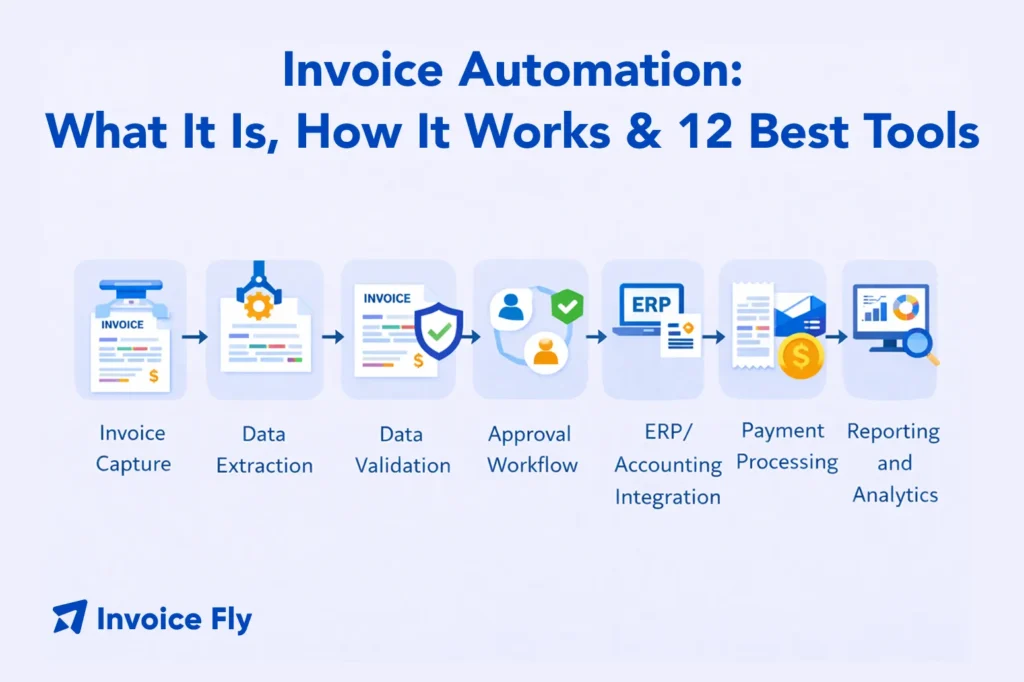
Table of Contents
- What Is Invoice Automation?
- What Is Invoice Automation Software?
- How Does Invoice Automation Work?
- How to Automate Invoice Processing
- Send Invoices in Seconds
- Top 12 Invoice Automation Software Tools
- What Are the Benefits of Invoice Automation?
- Choosing the Right Invoice Automation Software
- Conclusion
- Send Invoices in Seconds
- FAQs
Invoice automation helps businesses stop wasting time on manual data entry and repetitive admin work. Instead of typing in invoice details line by line, software uses artificial intelligence (AI) and optical character recognition (OCR) to capture, process, and approve invoices automatically—from the moment they arrive to the moment they’re paid.
By automating invoice processing, companies can reduce errors, speed up approvals, and get a much clearer view of their cash flow. Whether you’re managing accounts payable at scale or simply trying to streamline your invoicing as a small business owner, understanding how invoice automation works is the first step. In this guide, we’ll explain how invoice automation software works, explore the best tools available, and show how to automate your invoicing process.

What Is Invoice Automation?
Invoice automation is the use of technology to handle repetitive invoicing tasks that would otherwise require manual effort. It can mean two different things depending on your role: for small businesses, it typically means automating outgoing invoices — sending, tracking, reminders, and payment collection. For finance teams and larger organizations, it usually means automating accounts payable invoice processing — capturing vendor invoices, routing for approval, and posting to your accounting system.
Automated invoice processing reduces the human touchpoints in the invoice lifecycle, cutting errors, accelerating approval cycles, and freeing up finance teams for higher-value work.
What Is Invoice Automation Software?
Invoice automation software digitizes and streamlines the invoice management process from end to end. Depending on the platform, it handles invoice capture, OCR data extraction, GL coding, three-way matching (invoice to purchase order to receipt), approval routing, payment processing, and accounting system integration.
At the simpler end, tools like Invoice Fly automate invoicing for small businesses — sending invoices, collecting payments, and tracking status without manual follow-up. At the enterprise end, platforms like SAP Concur or Coupa manage complex AP workflows across large organizations processing thousands of vendor invoices per month.
For a foundational understanding of what invoices include and how they work, see our guide on what is an invoice.
How Does Invoice Automation Work?
The automated invoice processing workflow follows four core steps:
- Capture: AI and OCR technology extracts data from incoming invoices — whether they arrive as PDFs, emails, or paper scans — and converts it into structured digital data.
- Match: The system matches the invoice against purchase orders and goods receipts to verify accuracy before routing for approval.
- Approve: Invoices are automatically routed to the appropriate approvers based on predefined rules — by amount, vendor, department, or cost center — via email or mobile.
- Pay and post: Once approved, payment is processed and the transaction syncs to the ERP or accounting system for record-keeping.
The IRS recognizes electronic accounting software records as valid for tax and audit purposes, making the shift from paper to digital invoicing a compliance-safe move for businesses of any size. The Association of Financial Professionals also notes that AP automation is one of the most impactful controls a finance team can implement to reduce payment fraud and processing errors.
Understanding your invoice payment terms and invoice due dates before setting up any automated workflow is essential — automation enforces the rules you configure, so getting those rules right from the start matters.

How to Automate Invoice Processing
If you’re starting from scratch, here’s the step-by-step process:
- Standardize invoice intake — Decide how invoices will arrive (email, portal, EDI) and set a consistent format requirement for vendors where possible.
- Connect your accounting or ERP system — Your automation tool needs to sync with your existing financial system to avoid duplicate data entry.
- Set approval rules — Define who approves what, based on amount, vendor, or department.
- Automate matching and coding — Configure three-way matching rules and GL coding logic so the system can process clean invoices without human review.
- Test exception handling — Make sure the workflow correctly flags mismatches, duplicates, and missing POs before going live.
- Monitor dashboards and optimize — Track processing time, exception rates, and approval bottlenecks and adjust rules as needed.

Top 12 Invoice Automation Software Tools
Features, pricing, and integrations can change over time, so always confirm the current offering before choosing a platform.
1. Invoice Fly — Best for Small Business Automated Invoicing
Invoice Fly is built for service-based small businesses that need to send professional invoices, track payment status, and collect payment from their phone. The invoice generator creates itemized invoices in seconds, invoice payments let clients pay online directly from the invoice, and automated notifications follow up on overdue invoices without manual chasing. It’s a strong fit for contractors, tradespeople, and small business owners who want invoicing automation without enterprise complexity.
2. Tipalti — Best for Global Accounts Payable
Tipalti automates the complete AP workflow for mid-market and enterprise businesses, including supplier onboarding, invoice processing, tax compliance, and global mass payments across 196 countries. A strong choice for businesses with international vendor payment needs.
3. BILL — Best for SMB AP and AR Workflows
BILL automates both accounts payable and receivable for small and mid-sized businesses, with approval routing, bank sync, and integrations with QuickBooks, Xero, and NetSuite. One of the most widely adopted AP automation platforms in the SMB segment.
4. Stampli — Best for Collaborative Invoice Approval
Stampli centers its workflow directly on the invoice — all communication, approvals, and documentation happen on the invoice itself rather than in a separate thread. A strong fit for teams that need transparent, fully auditable AP workflows.
5. Ramp — Best for Spend Management with AP Automation
Ramp combines corporate cards, expense management, and accounts payable automation in one platform. A strong option for companies that want consolidated spend visibility alongside invoice processing.
6. AvidXchange — Best for Mid-Market AP Integration
AvidXchange integrates with over 240 accounting and ERP systems, making it one of the most broadly compatible AP automation platforms for mid-market businesses. It handles invoice capture, approval workflow, and electronic payment processing end to end.
7. Coupa — Best for Enterprise Procurement and Invoice Management
Coupa is a comprehensive business spend management platform covering procurement, invoicing, and AP automation at enterprise scale. A significant investment, but it delivers robust controls, reporting, and compliance tools for large organizations.
8. Rillion — Best for ERP-Integrated Invoice Processing
Rillion focuses on invoice data capture and AP automation with tight integrations to major ERPs. Well-suited for organizations that need invoice automation to feed directly into existing ERP infrastructure without disruption.
9. Quadient AP — Best for High-Volume Invoice Capture
Quadient’s AP automation solution uses AI-powered data capture and intelligent matching to reduce manual touchpoints across the invoice lifecycle. A good fit for organizations processing high volumes of invoices in diverse formats.
10. Medius — Best for AI-Driven AP Automation
Medius uses AI to automate invoice matching, exception handling, and fraud detection — minimizing manual intervention even on complex or mismatched invoices. Designed for mid-to-large enterprises with demanding accuracy requirements.
11. SAP Concur Invoice — Best for Enterprise SAP Environments
SAP Concur Invoice is the AP automation module within the broader SAP Concur ecosystem. The natural choice for enterprise organizations already running SAP ERP who need AP automation that integrates natively with existing infrastructure.
12. Airbase — Best for Comprehensive Spend Control
Airbase combines AP automation, corporate cards, and expense reimbursements in a single platform with strong approval workflow controls. Built for growing companies that want to automate spend across all channels — not just vendor invoices.
Here is a quick summary of those tools below, grouped to help you find the right match quickly.
| Segment | Best Fit Automated Invoicing Tools |
| Small business invoicing | Invoice Fly |
| SMB AP automation | BILL, Stampli, Ramp |
| Mid-market / ERP-heavy AP | AvidXchange, Rillion, Medius, Quadient |
| Enterprise procurement / AP | Coupa, SAP Concur Invoice, Tipalti, Airbase |

What Are the Benefits of Invoice Automation?
Reduced processing costs: Manual invoice processing is time-intensive and expensive. Automating data capture, routing, and approval significantly reduces the labor cost per invoice and frees finance teams for higher-value analysis work.
Faster processing and payments: Automated routing eliminates delays caused by lost invoices, unclear approval chains, and manual follow-up. Faster processing means capturing early payment discounts and avoiding late payment penalties. Setting clear net 30 or net 15 payment terms gives your automation a clear framework to enforce from the start.
Improved accuracy: OCR and AI-powered data extraction reduce data entry errors. Three-way matching catches discrepancies between invoices, purchase orders, and receipts before payment — protecting the business from overpayments and fraud.
Real-time visibility: Automation platforms typically include dashboards showing the status of all invoices in the pipeline — captured, pending approval, overdue, and paid. That visibility is critical for cash flow forecasting and invoice factoring decisions.
Audit readiness: Digital invoice workflows create a complete, timestamped audit trail. Every approval, exception, and payment is recorded — making compliance reviews and tax audits significantly easier to manage.
Scalability: As your business grows, manual invoicing processes break down. Automation scales with volume without requiring proportional headcount growth.
Common invoicing mistakes that automation helps prevent — duplicate payments, missing line items, and incorrect payment terms — are worth reviewing before you configure any automated workflow.
Choosing the Right Invoice Automation Software
The best tool depends on your business size, invoice volume, and existing systems.
For small businesses and independent contractors: Start with Invoice Fly for automated sending, tracking, and payment collection without enterprise complexity.
The free invoice generator and free invoice templates give you a peek into what automation can mean for your business immediately.
For SMBs with AP workflows: BILL, Stampli, or Ramp are solid mid-tier options that integrate with popular accounting software and provide approval routing without enterprise cost.
For mid-market and enterprise: AvidXchange, Tipalti, Rillion, or Medius offer the ERP integration depth, volume capacity, and compliance controls that larger organizations require.
Key questions to ask when evaluating any invoice automation solution:
- Does it integrate with your existing ERP or accounting software?
- How does it handle exceptions and mismatched invoices?
- How flexible is the approval workflow configuration?
- Does it support your payment methods and currencies?
- What does implementation and onboarding involve?
Before automating, make sure your invoicing process is clean. Our guides on how to write an invoice and professional invoice elements cover the foundational structure every invoice should have.

Conclusion
Invoice automation transforms one of the most time-consuming financial processes in any business into a streamlined, accurate, and scalable workflow. For small businesses, invoice automation usually means faster sending, automated reminders, and online payment collection. For finance teams, it usually means automating AP invoice capture, approvals, and posting — reducing manual effort and processing costs at scale. Either way, the right tool dramatically reduces the time and errors involved in managing invoices.
For small businesses and service contractors looking for the fastest path to automated invoicing, Invoice Fly’s invoice maker handles sending, tracking, and payment collection — all from your phone. Start with the free invoice generator to send your first automated invoice today.
