What Is an Invoice? A Simple Guide for Businesses
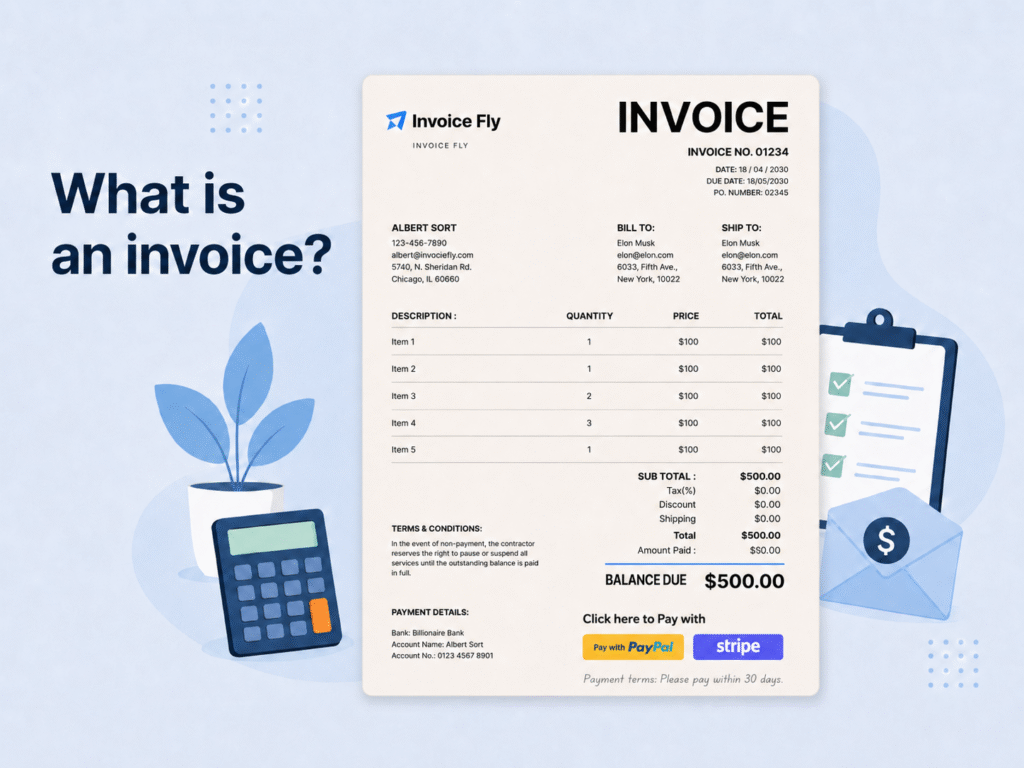
Table of Contents
Invoices are one of the simplest, and most important parts of running a business.
Whether you’re a freelancer sending invoices for client work, a small business tracking payments, or a growing company managing cash flow, invoices help keep payments organized and businesses moving forward.
In this guide, we’ll break down what invoices are, why businesses use them, what information they include, and how different invoice formats help companies manage billing more clearly and professionally.
What Is an Invoice?
Imagine completing a project, delivering a product, or finishing weeks of work, and then having no clear way to request payment for it. That’s one of the main reasons invoices exist.
An invoice is a business document used to request payment for products sold or services completed. It explains what was provided, how much is owed, and when payment is expected, helping both businesses and customers stay aligned throughout the payment process.
While quotes or estimates are often used to outline expected costs before work begins, invoices are usually issued once the work is completed or the products are delivered. In many cases, invoices also become the official financial record of a transaction.
For freelancers, small businesses, and larger companies alike, invoices play an important role in organizing billing, tracking payments, and maintaining accurate financial records. They also help businesses monitor cash flow, support tax reporting, and better understand how money moves through the business over time.
Professional invoices can also help businesses:
- Track payments, revenue, and outstanding balances
- Maintain records for accounting and tax purposes
- Create clearer agreements between businesses and customers
- Reduce confusion around billing and payment deadlines
- Monitor products, services, and overall business performance
- Support planning, forecasting, and long-term business growth
At their core, invoices do far more than request payment. They help businesses stay organized, build trust with customers, and create a more reliable financial system as the business grows.
Create and Send Invoices with Invoice Fly
Whether you’re billing clients weekly, monthly, or per project, Invoice Fly helps you create professional invoices, track payments, and stay organized from anywhere.

RELATED ARTICLE: How To Write An Invoice? Includes Invoice Template & Examples
RELATED ARTICLE: How To Make An Invoice In Google Docs? Invoice Templates for Google Docs
Key Elements of an Invoice
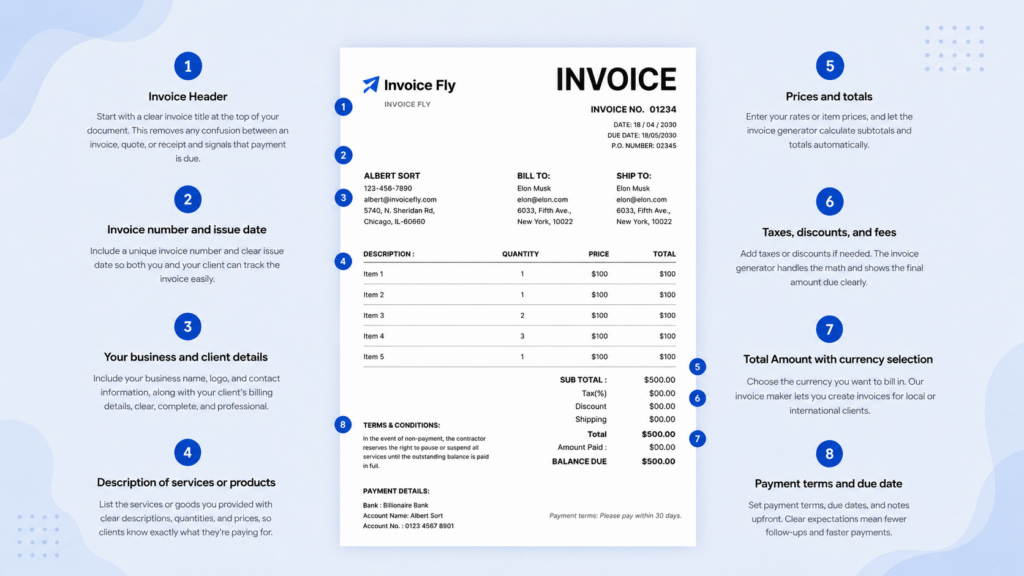
Every invoice should include these important details and sections. Read our list to understand why they are important and how to add them to your invoice to bring it all together.
1. An Invoice Header
One of the most basic parts of an invoice, the header section should have the word “INVOICE” clearly visible at the top. This might seem obvious, but it’s important! The invoice header immediately tells your customer what the document is: an invoice.
Make your invoice heading stand out by:
- Using a larger font size
- Making it bold
- Positioning it prominently at the top of the page
This simple step of including a header as part of your invoice helps your document get noticed and processed faster, especially if your client receives lots of different documents.
2. Invoice Number or a Unique Identifier
Each invoice needs its own unique number or identifier. This element of the invoice helps both you and your customer keep track of payments and organize records.
Your invoice numbering system can be simple or detailed:
- Simple: Invoice #001, #002, #003, etc.
- Detailed: INV-2023-001 (year + sequential number)
- Customer-specific: ABC-001 (customer code + sequential number)
Whatever system you choose, be consistent. This part of your invoice makes it easier to find specific invoices later and helps with bookkeeping.
3. Your Company’s Details
Another detail your invoice must include is your business information:
- Business name
- Address
- Phone number
- Email address
- Website (if you have one)
- Tax ID number or business registration number (if applicable)
If you have a logo, add it to your invoice to make it look more professional and build brand recognition.
For sole traders or freelancers, you might need to include your personal name along with your business name. This is especially important if your business isn’t registered as a separate entity.
4. Client’s Details
Just as important as your details are your client’s details:
- Client’s name (individual or company)
- Contact person’s name (if sending to a company)
- Complete address
- Phone number
- Email address
Making sure these details are correct is crucial. Invoices with incorrect information often get delayed or lost, which means you have to wait longer to get paid, making this part of your invoice especially important.
5. Due Date on the Invoice
Always include a clear payment due date on your invoice. This invoice detail tells your client exactly when you expect to be paid.
Common payment terms include:
- Due upon receipt (payment expected immediately)
- Net 7 (payment due within 7 days)
- Net 15 (payment due within 15 days)
- Net 30 (payment due within 30 days)
- Net 60 (payment due within 60 days)
Choose payment terms that work for your business and cash flow needs. Whatever terms you choose, make the due date crystal clear to avoid confusion. Make sure this info stands out on your invoice.
6. Goods or Services Sold
One of the most important elements of an invoice is the detailed list of what you’re charging for. For each line item, include:
- Clear description of the product or service
- Quantity or hours
- Rate per unit or hour
- Subtotal for each line item
Be specific in your descriptions. Instead of “Consulting Services,” try “Website SEO Consulting – 10 hours at $75/hour.”
If you’re providing ongoing services, include the date range: “Social Media Management, May 1-31, 2023.”
Detailed descriptions prevent confusion and reduce the chances of payment disputes.
7. Fees or Taxes as an Invoice Component
If you charge additional fees or need to collect taxes, list these separately:
- Sales tax
- VAT (Value Added Tax)
- Service fees
- Shipping or delivery charges
- Late fees from previous invoices
Make sure each fee or tax is clearly labeled and calculated correctly. This transparency helps build trust with your clients and ensures you’re collecting the right amount of tax.
For international clients, you might need special tax considerations. Our article on What is a Proforma Invoice? can help with international transactions.
8. Total Amount Due
After listing all items, fees, and taxes, the next important part of the invoice is the total. Clearly state the total amount due. This should be easy to find and read. Consider making it bold or placing it in a box.
If you offer discounts, show:
- Original subtotal
- Discount amount
- New subtotal after discount
- Taxes/fees
- Final total
For example:
Subtotal: $500.00
Discount (10%): -$50.00
New Subtotal: $450.00
Sales Tax (8%): $36.00
TOTAL DUE: $486.00
9. Payment Methods
Add to your invoice a section where you tell your client exactly how they can pay you:
- Credit/debit card
- Bank transfer/ACH
- Check
- PayPal, Venmo, or other payment apps
- Cash
Include all relevant details for each payment method, such as:
- Your bank account details for transfers
- Links to online payment options
- Who to make checks payable to
- Physical address for mailing checks
The easier you make it to pay, the faster you’ll receive your money, which makes this invoice section just as important as all the rest.
10. The Terms of the Transaction
The final invoice element to include are any important terms and conditions:
- Payment due date (as mentioned earlier)
- Late payment penalties
- Early payment discounts
- Refund policy
- Warranty information
- Any other relevant terms
Keep these terms simple and straightforward. Avoid legal jargon when possible, but make sure your bases are covered. If you need help with specific wording for your invoices, our guide on How to Write an Invoice?: Includes Template and Examples offers great templates and examples.
For example, Mike runs a small landscaping business and struggled with getting paid on time until he redesigned his invoices.
His new invoices include a bold “INVOICE” header at the top, consistent numbering (LAND-2023-001), his company logo and complete contact details, itemized services with specific descriptions (“Lawn Mowing – 0.5 acres” instead of just “Lawn Services”), clear payment terms (Net 15), and multiple payment options including a QR code for instant electronic payments.
The result? His average payment time dropped from 45 days to just 12 days, and clients stopped calling with questions about what they were being charged for, saving Mike hours of administrative work each month.
Remember that the info you add to your invoices may be different. You may use your personal tax ID or Social Security Number, unless you have a separate EIN.
Other invoice parts to include
While putting on your invoice the 10 elements above are essential, there are additional invoice parts that can make it even more effective:
- Thank You Note: A simple “Thank you for your business!” can go a long way in building client relationships.
- Special Instructions: Any specific notes about the products or services provided.
- Future Appointments: If you’re a service provider, note the next scheduled appointment.
- Reference Numbers: Include any client PO (Purchase Order) numbers or project codes. For more information, see What is a PO Number?
- Summary of Hours: For service-based businesses, a summary of total hours worked over a time period.
- Discount Information: Explain any discounts applied and why (loyalty discount, volume discount, etc.).
What Should An Invoice Look Like?
What your invoice looks like matters almost as much as the contents–what you need to put on your invoice. Here are some tips to make your invoices look more professional.
- Use a Consistent Design: Maintain the same layout, colors, and fonts across all your invoices.
- Add Your Logo: Include your business logo to strengthen your brand identity.
- Use Color Strategically: A splash of color can make important information stand out, but don’t overdo it.
- White Space Is Your Friend: Don’t cram too much information together. Use spacing to make your invoice easy to read.
- Choose Professional Fonts: Stick to clean, professional fonts like Arial, Calibri, or Helvetica.
- Quality Paper for Print Invoices: If you mail physical invoices, use good quality paper.
- Mobile-Friendly Digital Invoices: If you send digital invoices, make sure they look good on mobile devices too.
Our Invoice Templates make it easy to create professional-looking invoices without having to design them from scratch. Even as a one-person business, professional invoices are crucial for getting paid properly and on time.
Today, many businesses send invoices digitally instead of using paper documents or manual invoice templates. Digital invoices are often easier to track, faster to deliver, and more convenient for both businesses and customers.
Using digital invoice software can also help businesses export invoices, organize records more efficiently, automate reminders, and improve payment collection over time.
Common Types of Invoices
Businesses use different types of invoices depending on how and when they charge customers. Some invoices are used before work begins, while others are sent after products are delivered or services are completed.
Understanding the most common invoice types can help businesses choose the right format for different billing situations.
Standard Invoice
A standard invoice is the most commonly used invoice format. Businesses usually send it after a product is delivered or a service is completed to request payment from the customer.
Sales Invoice
When a business sells a product or service, it may issue a sales invoice to record the transaction and request payment from the buyer.
Proforma Invoice
Before work begins or goods are shipped, businesses may send a proforma invoice to outline estimated costs, quantities, and payment terms. Unlike a final invoice, it is not an official payment request.
Retainer Invoice
Some businesses request partial payment before work begins. A retainer invoice is used to collect an upfront payment for ongoing services, consulting work, or long-term projects.
Interim Invoice
Large projects are not always billed all at once. Interim invoices allow businesses to request payment at different stages of a project instead of waiting until the final delivery, especially when using structured payment milestones.
Final Invoice
Once a project, order, or service has been completed, a final invoice is sent to request the remaining balance owed by the customer.
Timesheet Invoice
Freelancers, consultants, and contractors often bill clients based on the number of hours worked. A timesheet invoice helps break down hours, rates, and completed work clearly, especially when paired with a time tracker.
Recurring Invoice
Businesses that offer subscriptions or ongoing services often use recurring invoices. These invoices are automatically sent at regular intervals, such as weekly, monthly, or yearly.
Credit Invoice
Mistakes, refunds, or discounts can sometimes change the original invoice amount. A credit invoice is used to reduce the balance owed by the customer.
Debit Invoice
If additional work, fees, or charges need to be added after an invoice has been issued, businesses may send a debit invoice to increase the total amount due.
Commercial Invoice
When goods are shipped internationally, customs authorities usually require additional documentation. A commercial invoice includes details about exported products, their value, and the buyer and seller involved in the transaction.
Overdue Invoice
Unfortunately, payments do not always arrive on time. An overdue invoice acts as a reminder that payment is still outstanding after the original due date has passed. Learn more about how to follow up on unpaid invoices.
Invoice vs Bill vs Receipt
If you’re new to running a business or working as a freelancer, it’s easy to confuse invoices, bills, and receipts. While these documents may look similar, each one serves a different purpose in the payment process.
The simplest way to think about them is:
- An invoice requests payment
- A bill asks for immediate payment
- A receipt confirms that payment has already been made
Invoice
An invoice is a formal payment request sent after products are delivered or services are completed. It usually includes invoice details, payment terms, and a due date.
Many invoices also include net payment terms, such as Net 15, Net 30, or Net 60, which tell the customer how many days they have to complete the payment.
Businesses commonly use invoices when working with clients, ongoing projects, or services that are billed after the work is completed. Learn more about Net 30 vs Net 60.
Bill
A bill is also a request for payment, but it is usually expected to be paid immediately. Bills are commonly used in restaurants, retail stores, salons, and other point-of-sale businesses.
Receipt
A receipt is proof that payment has already been completed. It confirms what was purchased, how much was paid, and when the transaction took place.
Receipts are often used for recordkeeping, expense tracking, returns, and tax purposes.
Understanding the difference between invoices, bills, and receipts can help businesses manage payments more clearly and keep financial records organized as they grow.
Read more about invoices vs. bills and invoices vs. receipts.
Does an invoice mean I owe money?
In most cases, yes. Receiving an invoice usually means that payment is due for products or services that have already been provided.
An invoice acts as a formal payment request and includes important details such as the amount owed, payment terms, and the due date. Once payment is completed, the invoice can also serve as a record of the transaction for both the business and the customer.
How does an Invoice work?
Invoicing might seem simple, but it’s one of the most important parts of running a business. When done the right way, it helps you get paid faster, stay organized, and keep your finances stress-free.
Take a quick look at the main steps in the invoicing process:
- Invoice Creation: Make a new invoice that lists your products or services, prices, and payment details.
- Invoice Delivery: Send the invoice to your client, usually by email or through invoicing software.
- Payment Tracking: Keep an eye on which invoices have been paid and which are still open.
- Record-Keeping: Store copies of all invoices as required by the IRS for your financial records and taxes.
Create Invoices with Invoice Fly
Creating invoices manually can take time, especially when managing multiple clients, payment deadlines, and billing records. Many businesses now use invoicing apps like Invoice Fly to simplify billing, track payments, and keep everything organized in one place.
With the Invoice Fly App, you can create professional invoices from your phone, customize invoice templates, add payment terms, track invoice statuses, and send invoices to clients in just a few steps. If you prefer working from a desktop browser, you can also generate free professional invoices online.
Whether you invoice customers weekly, monthly, or per project, Invoice Fly helps simplify billing and makes it easier to manage invoices, payments, and financial records as your business grows.
FAQs about Invoices
An invoice is a document businesses send to request payment for products sold or services provided. It includes details such as pricing, payment terms, due dates, and customer information.
Invoices are used to request payment and keep records of business transactions. They help businesses track sales, manage payments, and maintain accounting documentation.
No. An invoice requests payment, a bill is usually due immediately, and a receipt confirms that payment has already been made.
Start with a simple template that includes the basics: your name, the client’s name, what you’re charging for, and the total. Use a free invoice generator or software to make it easier to create, send, and track invoices.
Invoices and bills are similar because both request payment, but they are usually used in different situations. Invoices often include payment terms and due dates, while bills are commonly paid immediately.
Most invoices include business and customer information, invoice numbers, payment terms, due dates, product or service descriptions, pricing, taxes, and the total amount owed.
Yes. Some businesses create invoices manually using Word or Excel templates, while others use invoicing software or mobile apps to automate the process.
If an invoice is overdue, payment has not been received by the due date. Businesses often send payment reminders or overdue invoices to follow up on unpaid balances.
Create and Send Invoices with Invoice Fly
Whether you’re billing clients weekly, monthly, or per project, Invoice Fly helps you create professional invoices, track payments, and stay organized from anywhere.

Sonali Khanna is Head of Content at Invoice Fly, with experience in business, product marketing and entrepreneurship. A former Google professional and founder of Lite Elephant Publishing, she has developed marketing and content strategies for brands including Bang & Olufsen, Formula 1, NET-A-PORTER, Arsenal FC and Liverpool FC.
Sonali holds a master’s degree in International Economics and Finance from The University of Queensland and has built and launched digital products across international markets. At Invoice Fly, she creates practical content for small business owners and entrepreneurs.
