Invoice Payments: How They Work, Terms And Best Practices
An invoice payment is money paid toward an invoice to cover goods or services. Customers can pay the full amount at once or make partial payments, depending on the agreed terms.
Whether you’re paying a supplier or collecting payment from a customer, understanding how invoice payments work helps you avoid billing errors, missed deadlines, and duplicate payments.
What is an invoice payment?
An invoice payment is the transfer of money from a customer to a business against an outstanding invoice.
Depending on the agreement, payment may take place before, during, or after the goods or services are delivered.
The invoice itself is a request for payment, not confirmation that money has been received. Learn more in our guide on what is an invoice.
Invoice payment vs. invoice receipt
An invoice, payment, and receipt serve different purposes.
Record | Purpose |
|---|---|
Invoice | Requests payment and outlines the terms |
Payment | Transfers money toward the amount owed |
Receipt | Confirms the amount received |
A partial payment reduces the outstanding balance, while a confirmed full payment settles the invoice.
Example of an invoice for payment
Imagine a contractor sends a customer the following invoice, with partial payments agreed in advance.
Invoice details | Example |
|---|---|
Invoice number | INV-1001 |
Issue date | November 4, 2026 |
Service total | $750.00 |
Payment terms | Net 30 |
Due date | December 4, 2026 |
Initial balance | $750.00 |
The customer can make partial payments, provided the full $750 is paid by the agreed deadline. This illustrative example uses USD and excludes discounts, fees, and a separate tax breakdown.
How the invoice payment process works
Paying an invoice involves checking the charges, confirming the payment instructions, and keeping a record of the transaction.
Step 1: Customer receives the invoice
The business sends an invoice containing the customer’s details, itemized charges, total, payment instructions, and due date.
Make sure it reaches the correct customer or accounts payable contact.
Step 2: They verify items, totals, and POs
The customer checks that the invoice matches the agreed price, order, and goods or services received.
Where applicable, businesses can compare the purchase order (PO), delivery record, and invoice. This is known as three-way matching, but not every service invoice requires it.
Step 3: They review the payment terms
The customer checks when payment is due, whether installments are permitted, and whether any discounts or agreed late fees apply.
Step 4: They choose a payment method
The customer selects an accepted method, such as ACH, credit card, check, or online checkout.
Step 5: Customer sends the payment
The customer submits the payment using the correct invoice number as a reference where possible.
A payment notification or remittance notice doesn’t necessarily mean the seller has received the funds.
Step 6: Business sends a receipt
Once payment is confirmed, the business records the amount received, updates the outstanding balance, and issues a receipt or payment acknowledgment.
Invoice payment terms (with examples)
Invoice payment terms establish when and how a customer must pay. Specify an exact due date and whether the agreed period uses calendar or business days.
The following examples use an invoice issued on November 4, 2026, and calendar days.
Net 30 invoice payment
Payment is due within 30 days of the invoice date. For INV-1001, the deadline is December 4.
Learn more about net 30 payment terms.
Net 15 invoice payment
Payment is due within 15 days, making November 19 the deadline in this example.
Shorter net 15 payment terms can suit businesses with frequent material or operating expenses.
Due on receipt
Payment is expected when the customer receives the invoice, rather than after a set credit period.
End of month (EOM)
Payment is due at the end of the specified month. For an invoice issued November 4 with payment due that month’s end, the deadline is November 30.
2/10 Net 30
The customer receives a 2% discount if they pay within ten days. Otherwise, the full amount is due within 30 days.
For a $750 invoice offering these terms, the customer could pay $735 by November 14 or the full $750 by December 4.
Invoice payment methods explained
The best invoice payment method depends on transaction fees, processing times, customer preferences, and whether the payment is domestic or international.
1. Wire transfer
Wire transfers move money electronically between financial institutions. They’re often used for larger or international payments.
Check sending fees, intermediary bank charges, currency conversion costs, and expected delivery times.
2. ACH and bank transfers
Automated Clearing House (ACH) payments move money electronically between participating US financial institutions.
According to Nacha, the ACH Network supports electronic payments such as direct deposits and bill payments.
ACH and wire transfers use different systems, so their fees, processing times, and availability can differ.
3. Credit card payments
Customers can pay invoices using an accepted credit or debit card. Businesses should account for processing fees, potential disputes, and provider payout schedules.
4. Online invoice payment
An invoice with payment options allows customers to open a link and complete checkout through their browser.
Depending on the provider, customers may be able to pay by card, bank transfer, PayPal, or an eligible digital wallet.
Online checkout is the payment interface rather than a separate method of transferring funds. Our mobile payment guide explains how customers can pay invoices from their phones.
5. Check payments
Customers can mail or deliver a check with the invoice reference. Record the payment details and confirm clearance before treating the funds as settled.
If you accept cash, issue a receipt and keep a record of the amount received.
For international invoices, compare supported countries, currencies, exchange rates, transaction fees, and delivery times before choosing between bank transfers, cards, or online payment providers.
Payment details on an invoice
Clear payment instructions help customers pay the correct amount without contacting you for additional information.
Include:
- Invoice number and customer details.
- Total amount and outstanding balance.
- Exact payment due date.
- Accepted payment methods.
- Secure payment link or relevant bank instructions.
- Payment reference and any agreed terms.
If a supplier sends new bank details, confirm the change through a trusted contact method before transferring money.
The FBI recommends independently verifying changes to account numbers or payment procedures to reduce the risk of business email compromise scams.
Invoice payment receipts
A payment receipt confirms how much money a business has received from a customer.
It should include the payment date, invoice reference, amount received, payment method, and any remaining balance.
For example, if a customer pays $250 toward INV-1001, the receipt should confirm the $250 payment and show that $500 remains outstanding.
The IRS identifies receipts and invoices as supporting documents for business transactions.
Our invoice vs receipt guide explains the difference between these records.
You can also use a free receipt generator to create a payment acknowledgment after confirming receipt of the money. The generator itself doesn’t verify or process payments.
Invoicing and payment software
Using invoicing software helps you keep invoices, payment instructions, and outstanding balances in one place.
With Invoice Fly, you can:
- Create a numbered invoice with customer details, charges, and payment terms.
- Connect Stripe or PayPal and enable the payment option.
- Send the invoice link to your customer.
- Track the invoice’s payment status.
- Follow up on outstanding balances.
The Invoice Fly Help Center explains how to connect payment providers and enable payments.
Customers can open the invoice and complete checkout without installing Invoice Fly, as explained in the Invoice Fly customer invoice guide.
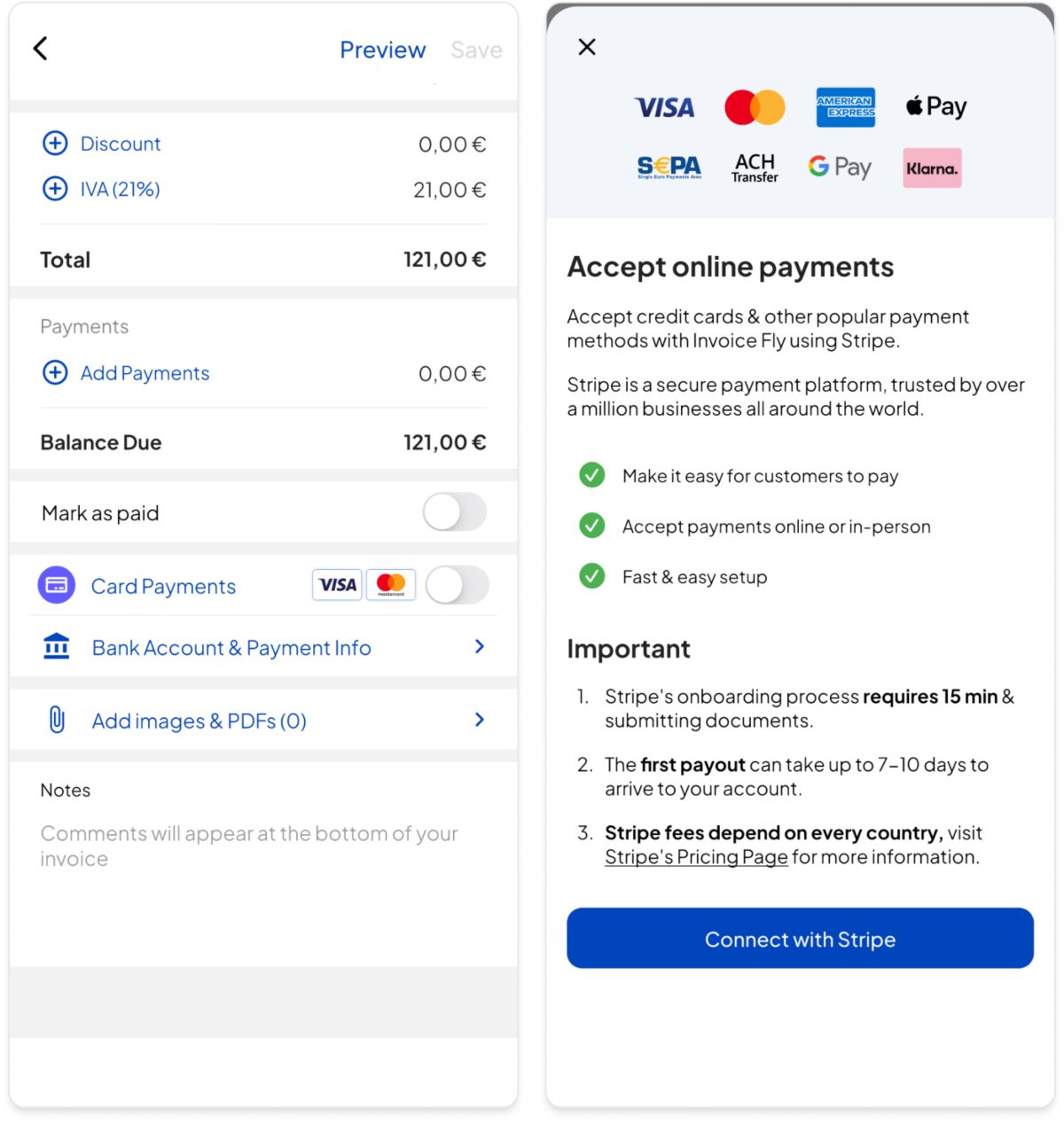
The interface below shows how customers can access online payment options directly from their invoices.
Linking invoice IDs to payment records
Invoice payment software can associate payments made through invoice checkout with the relevant invoice. Payments received separately may require manual recording.
Keep the invoice number, customer, due date, payment date, amount, reference, status, and outstanding balance together.
Here’s how two confirmed payments would be recorded against our illustrative $750 invoice.
Record | Amount | Remaining balance |
|---|---|---|
INV-1001 issued November 4 | $750 invoice | $750 |
PAY-001 received November 14 | $250 paid | $500 |
PAY-002 received December 4 | $500 paid | $0 |
Both payments relate to INV-1001. The invoice is fully paid only after the final payment is confirmed.
The example below shows how individual payment references can be linked to one invoice while tracking its remaining balance.
[INSERT IMAGE: Invoice Partial Payment Tracker]
For payments received outside Invoice Fly’s checkout, confirm receipt before marking a fully settled invoice as paid. The Invoice Fly invoice guide explains payment notes and the Mark as Paid feature.
Remember that a paid invoice doesn’t necessarily mean the funds have reached your bank account. If a provider deducts processing fees before paying out, retain the payment, fee, and payout records for invoice reconciliation.
Best practices for faster invoice payments
1. Automate reminders
Set up payment reminders where supported, and make sure they reflect the current outstanding balance.
For example, after receiving the first $250 payment for INV-1001, you could send:
Hi [Name], a quick reminder that the remaining $500 on invoice INV-1001 is due December 4. You can use the payment link on the invoice. Please let me know if you need any details.
Use our payment reminder templates for more examples.
2. Offer at least two payment methods
Giving customers a choice, such as card or ACH, can make payment more convenient. Consider the fees and availability of each method before offering it.
3. Include clear payment instructions
Make the amount due, payment deadline, and payment reference easy to find. Missing information can delay approval or payment.
4. Use online payments whenever possible
Adding a payment link lets customers pay without manually entering your bank details. Check which methods your provider supports and what they cost.
5. Integrate with accounting software
Where supported, accounting integrations can reduce duplicate data entry. Otherwise, export and reconcile your records regularly.
Invoice Fly’s business reports can help you review your business finances and monitor outstanding invoices.
Ready to get your invoice paid?
If you only send occasional invoices, our free invoice generator can help you create one.
If you’re regularly billing customers, Invoice Fly lets you send invoices, enable online payments through Stripe or PayPal, and keep track of what you’re still owed.