
What Is Invoice Processing And How Does It Work?
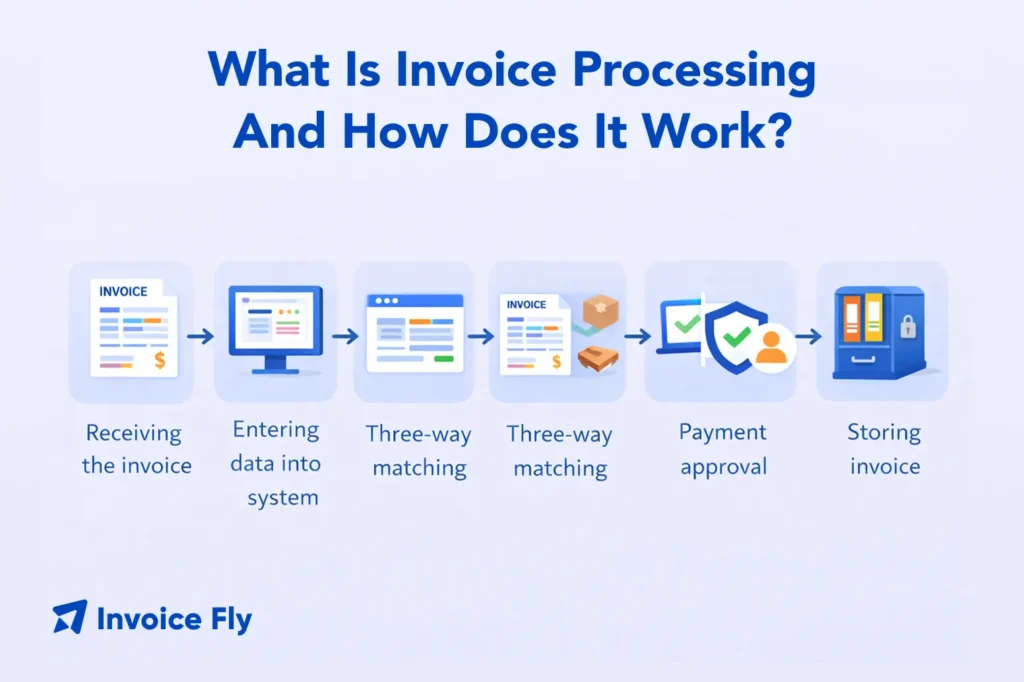
Table of Contents
Invoice processing is how businesses handle incoming invoices—from the moment a vendor sends a bill to the moment it’s approved, paid, and recorded. If you’ve ever chased approvals, double-checked line items, or worried about paying the wrong amount, you’ve already seen how important this process is to keeping finances accurate and under control.
At its core, invoice processing is a structured accounts payable workflow: receiving invoices, verifying details, routing approvals, and making sure payments happen on time. When done well, it reduces errors, prevents duplicate payments, and keeps cash flow predictable. In this guide, we’ll break down how invoice processing works, the key steps involved, and how to manage it more efficiently as your business grows.
What is invoice processing?
Invoice processing refers to the complete accounts payable workflow — from the moment a vendor invoice arrives to when the payment is recorded in your books. At its core, it is how your business handles billing from suppliers, contractors, and service providers.
In most business contexts, invoice processing refers to the accounts payable side of the workflow — handling incoming vendor invoices rather than sending outgoing invoices.
Every invoice that enters your system needs to be verified, matched against what was ordered or agreed upon, approved by the right person, and paid on time. When you understand what an invoice is and the role it plays in your accounting cycle, it becomes easier to build a consistent workflow that protects your cash flow and vendor relationships.
Good invoice processing keeps your accounts payable ledger accurate, reduces the risk of late fees, and ensures your business stays compliant with financial recordkeeping standards outlined by the IRS.

Types of invoice processing
There are three main approaches to invoice processing, depending on your business size, invoice volume, and workflow complexity:
| Type | How It Works | Best For |
| Manual invoice processing | Paper-based or email workflows with manual data entry and approval routing | Small businesses with low invoice volume |
| Automated invoice processing | Uses software, AI, and OCR to capture data, match POs, and route approvals automatically | Growing businesses handling high volumes or looking to reduce errors |
| Hybrid invoice processing | Combines automation for routine invoices with manual handling for exceptions or non-PO invoices | Businesses transitioning to automation or managing mixed complexity |
Understanding which approach fits your business depends on your invoice volume, team size, and the complexity of your vendor relationships.

How to process invoices
Whether you handle two invoices a week or two hundred, following a consistent process protects you from errors and late payments. Here are the six core steps in a standard invoice processing workflow.
1. Receive and enter the invoice
The first step is capturing the invoice when it arrives — by email, mail, or a supplier portal. Centralizing all incoming invoices in one place (a shared inbox or accounting system) ensures nothing gets missed. Record the invoice number, vendor name, date, and total amount as soon as it arrives. The sooner you log it, the easier the rest of the workflow becomes.
2. Identify and authenticate key data points
Before an invoice moves forward, you need to verify the details. This means confirming that the vendor information matches your records, the line items match what was delivered or agreed to, and the invoice due date and payment terms are clearly stated.
For purchase order (PO) invoices, this step also involves a three-way match — comparing the invoice against the original purchase order and the receiving report. If all three align, the invoice can move to approval. If there’s a discrepancy, you’ll need to flag it for review before proceeding.

3. Seek invoice approval
Once verified, the invoice needs to go to the right person for sign-off. Most businesses route invoices based on department, cost center, or dollar amount. Larger invoices may require multiple approvers. Setting up a clear approval hierarchy prevents bottlenecks and ensures that payments are authorized at the right level before money leaves the account.
4. Analyze payment options
Not all invoices need to be paid immediately. Review the payment terms on each invoice — such as Net 30, Net 60, or Net 15 — and consider your current cash flow before scheduling the payment. The IRS outlines several payment options for businesses managing tax-related payments, which is worth reviewing if vendor payments intersect with quarterly obligations.
Early payment discounts (like 2/10 Net 30) can save money if your cash flow allows for it. Always weigh the benefit of the discount against your current liquidity.
5. Approve the payment plan
Once the payment timing is decided, schedule the payment through your accounting system or bank. This step should include selecting the payment method (ACH, check, wire transfer, or credit card), confirming the vendor’s payment details, and setting a firm payment date. Keeping a record of scheduled payments helps you avoid double-paying an invoice and makes it easy to track outstanding obligations.
6. Documentation for audits
Every processed invoice should be archived in an organized, retrievable format. This includes the original invoice, any purchase orders, receiving reports, approval records, and payment confirmation. The IRS burden of proof standards require businesses to maintain adequate records to substantiate their expenses — so proper documentation protects you during any tax audit or financial review.
Good recordkeeping also makes it easier to spot invoicing mistakes before they compound and supports accurate financial reporting. It also helps you stay on top of invoice late fees — both avoiding them on vendor bills and enforcing them on your own outstanding invoices.

How long does it take to process an invoice?
Processing time varies depending on your method and workflow complexity. Manual invoice processing can take several days depending on approvals and discrepancies, while automated systems can often reduce turnaround to a day or less for straightforward invoices.
Factors that affect processing time include invoice volume, the number of approvers required, whether the invoice matches a purchase order, and how quickly vendors respond to any follow-up questions. Establishing consistent professional invoice elements from your vendors — like clear itemization and payment terms — also reduces delays on your end.
If you’re regularly experiencing slow processing cycles, it’s often a sign that your workflow needs structure, not just speed.
Scaling your invoice management workflow
As your business grows, the volume and complexity of your accounts payable will grow with it. Processes that worked when you had five vendors may break down when you have fifty. That’s when it becomes important to invest in systems that scale with you.
Key strategies include centralizing invoice intake, standardizing approval workflows, and using consistent invoice templates so that your own outgoing invoices are easy for clients to process as well. Being clear on when to send invoices also helps keep your own billing cycle predictable and your cash flow steady.
Understanding what an invoice is at a structural level also helps you set expectations with vendors about the format and information you need from them to process invoices quickly.
What is automated invoice processing?
Automated invoice processing uses software tools — often powered by OCR (optical character recognition) and AI — to extract data from incoming invoices, match it against existing purchase orders, and route the invoice through your approval workflow without manual data entry.

For businesses sending their own invoices, using an invoice maker streamlines the outgoing side of the equation. You can create professional, itemized invoices in minutes, set payment terms, and track when invoices are viewed or paid — all from one platform.
If you’re looking to get started, Invoice Fly’s free invoice generator lets you create invoices quickly without a learning curve, so you spend less time on admin and more time running your business.
Conclusion
Invoice processing is more than just paying bills — it is a structured workflow that keeps your accounts payable running smoothly, your vendors satisfied, and your financial records audit-ready. By following a consistent six-step process — receiving, verifying, approving, scheduling, paying, and documenting — you reduce errors and stay in control of your cash flow.
Whether you’re a freelancer handling a handful of vendor relationships or a growing business managing dozens of accounts payable each month, building a clean invoice workflow pays off. Start with a free invoice template or use Invoice Fly’s invoicing software to streamline both sides of the billing process.
