Quicken vs QuickBooks: Which Is Better for Your Finances?
Table of Contents
Quicken vs QuickBooks can be confusing because the two names share some history, but they are now separate products from different companies.
Quicken covers personal finance as well as business tools. For this comparison, Quicken Business & Personal is the most relevant cloud-based option for freelancers, self-employed professionals and small-business owners. QuickBooks Online is built more specifically around business bookkeeping and accounting.
That difference affects everything from budgeting and invoicing to payroll, inventory and how you work with an accountant.
Quicken vs QuickBooks: Overview
First, Quicken and QuickBooks are not the same software and are no longer owned by the same company.
Quicken was originally part of Intuit but became an independent company in 2016. Aquiline Capital Partners acquired a majority stake in Quicken Inc. in 2021. QuickBooks remains an Intuit product.
There is another distinction to make before comparing features: Quicken is a product family, not a single application.
Its current lineup includes personal-finance products alongside two options particularly relevant to business users:
- Quicken Business & Personal: A cloud-based web and mobile app combining personal and business finances.
- Quicken Classic Business & Personal: Locally installed Windows and Mac software with personal, business and rental-property finance tools.
QuickBooks also has Online and Desktop products. This guide primarily compares Quicken Business & Personal with QuickBooks Online, while covering the desktop options separately where relevant.
Quicken vs QuickBooks at a glance
| Feature | Quicken Business & Personal | QuickBooks Online |
|---|---|---|
| Main focus | Personal + business financial management | Business bookkeeping and accounting |
| Starting price | $8.99/month, billed annually | $38/month |
| Personal budgeting | Yes | Not a core feature |
| Investment tracking | Yes | Not a core feature |
| Retirement planning | Yes | Not a core feature |
| Business income/expenses | Yes | Yes |
| Invoicing | Yes | Yes |
| Unlimited invoices | Yes | No invoice-count limit highlighted |
| Financial reports | Yes | Yes |
| Bank reconciliation | Limited compared with Classic | Yes |
| Payroll | No full-service payroll system | Separate QuickBooks Payroll |
| Inventory | Not a core feature | Plus+ |
| Projects/jobs | Yes | Plus+ for project profitability |
| Multiple businesses | Up to 10 | Company-based subscription structure |
| Accountant workflows | More limited | More extensive |
| Cloud access | Web + mobile | Web + mobile |
| Desktop option | Quicken Classic | QuickBooks Enterprise/current eligible renewals |
Prices checked September 2026.
The shortest way to separate the two is this: Quicken Business & Personal combines personal money management with tools for running a small business. QuickBooks Online goes further into dedicated business accounting.

Quicken
Quicken now covers several different types of financial management, so it’s important not to treat every Quicken product as business software.
Quicken Simplifi and the personal Quicken products focus on areas such as spending, budgeting, savings and investments. For a business comparison, the two relevant products are Quicken Business & Personal and Quicken Classic Business & Personal.

Features
Quicken Business & Personal brings personal and business finances into the same cloud-based app while allowing transactions to be categorized separately.
A subscription currently supports up to 10 businesses, with unlimited clients, projects and invoices.
Business tools include:
- Income and expense tracking
- Invoicing
- Billable expenses
- Receipt management
- Stripe payments
- Business cash-flow tracking
- Profit and loss reports
- Balance sheets
- Tax reports
- Schedule C, E and F workflows
You also get Quicken’s personal-finance functionality, including budgeting, spending analysis, savings goals, investment tracking, retirement planning and net-worth tracking.
Quicken Classic Business & Personal takes a desktop-based approach, with business reports covering areas such as P&L, cash flow, taxes and receivables. Features differ between Windows and Mac, with Windows currently offering a broader set of business and accounts payable tools.
A payroll report isn’t the same as payroll processing. Quicken shouldn’t be treated as having a full-service payroll system comparable with QuickBooks Payroll.
Pricing
Quicken currently displays:
- Business & Personal: $4.99/month for eligible new subscribers, with a regular displayed price of $8.99/month
- Classic Business & Personal: $10.99/month for eligible new subscribers, with a regular displayed price of $12.49/month
Both are billed annually.
Quicken was displaying these promotional rates when prices were checked in September 2026. Because Quicken changes its new-member offers periodically, check the current first-year price before subscribing.
For context, Quicken also sells personal-focused products such as Simplifi and Classic Deluxe/Premier. Those lower-priced options shouldn’t be compared with QuickBooks as though they include the same business functionality.
Pros and cons
Pros
- Combines personal and business finances
- Unlimited clients, projects and invoices in Business & Personal
- Personal budgeting, investments and retirement tools
- Business reports and tax schedules
- Supports multiple businesses
- Cloud and desktop product options
- Lower regular starting price than QuickBooks Online
Cons
- Not designed around full-service payroll
- Inventory isn’t a core business feature
- Less extensive multi-user and accountant workflows
- Business functionality varies significantly between Quicken products
- Quicken Classic and cloud Business & Personal have different workflows and feature sets
Independent Quicken reviews are available on Capterra.
QuickBooks
QuickBooks Online is dedicated business accounting software rather than a combined personal and business finance platform.

It covers core bookkeeping across every paid plan, with more operational and accounting functionality added as you move from Simple Start to Advanced.
Features
Simple Start covers:
- Income and expense tracking
- Bank feeds
- Transaction categorization
- Bank reconciliation
- Invoices and estimates
- Payment tracking
- Receipt capture
- Financial reports
Essentials adds bills and accounts payable, time tracking and support for up to three standard users.
Plus supports up to five standard users and adds:
- Project profitability
- Inventory
- Purchase orders
- Budgeting
Inventory tools can track quantity on hand, cost of goods, products and services, and restock information.
Advanced supports up to 25 standard users and adds more detailed reporting, dashboards, KPIs, custom roles and workflow automation.
QuickBooks Online also supports accountant access separately from its standard-user limits.
Pricing
Regular U.S. QuickBooks Online prices are:
- Simple Start: $38/month
- Essentials: $85/month
- Plus: $140/month
- Advanced: $340/month
QuickBooks also offers a 30-day trial route, although promotional pricing and free-trial eligibility can differ depending on the offer selected.
QuickBooks Payroll is priced separately from the accounting subscription.
Pros and cons
Pros
- Dedicated business bookkeeping and accounting
- Formal bank and credit-card reconciliation
- Bills and accounts payable from Essentials
- Inventory on Plus and Advanced
- Project profitability on Plus and Advanced
- Multi-user access
- Accountant collaboration
- Payroll available separately
- Large business-app ecosystem
Cons
- Higher regular starting price than Quicken Business & Personal
- No comparable personal budgeting or investment-management suite
- Several business features require higher plans
- Payroll adds another subscription cost
- Inventory requires Plus or Advanced
Independent QuickBooks Online reviews are available on Capterra.
Quicken vs QuickBooks: Detailed comparison
Quicken and QuickBooks cover different areas of financial management.
Personal finance vs business accounting
This is where the two products separate most clearly.
Quicken Business & Personal covers both sides of the picture. You can manage business income and expenses while also using tools for:
- Household spending
- Personal budgets
- Savings goals
- Investments
- Retirement planning
- Net worth
Business and personal transactions can remain separately categorized even though you can see them within the same financial system.
QuickBooks Online isn’t designed as a personal-finance app. Its tools are built around business accounts, customers, vendors, income, expenses and financial statements.
That makes this less about one platform having “more” and more about whether personal money management belongs in the software you’re choosing.
Accounting and bookkeeping
Both can track business income and expenses, but QuickBooks has a more extensive dedicated accounting structure.
QuickBooks Online includes bank feeds, transaction categorization and reconciliation, financial statements and accountant access. Essentials adds bills and accounts payable, while higher plans extend into inventory, projects and additional controls.
Quicken Business & Personal covers bookkeeping for self-employed and small-business users, including P&L, cash flow, balance sheets and tax reporting.
Quicken Classic Business & Personal goes further into some traditional desktop accounting workflows, including accounts receivable and accounts payable reports.
The IRS explains the records businesses may need to keep to support income and expenses. Whichever platform you use, software doesn’t remove the need to maintain appropriate business records.
Invoicing and payments
Both platforms can invoice customers, but the tools differ:
- Quicken Business & Personal: Includes unlimited clients, projects and invoices. You can add services, billable expenses, receipts and branding, with Stripe available for online payments.
- QuickBooks Online: Supports invoices, estimates, recurring transactions and online payments, with billing connected to the customer’s wider accounting record.
For more on the billing process, see our guides to how to send an invoice and setting invoice payment terms.
Expense tracking and tax management
Quicken’s combination of personal and business finances is particularly visible around taxes.
Business & Personal can separate business expenses and includes built-in Schedule C, E and F workflows where relevant. That can help self-employed users and rental-property owners organize transactions for tax preparation.
QuickBooks focuses on business tax records. Transactions can be categorized and reconciled, with reports feeding into the wider bookkeeping process.
Neither product replaces professional tax advice or tax-filing software simply by organizing financial records.
Financial reports
Quicken’s available reports depend partly on which Quicken product you’re using.
Business & Personal includes reports such as:
- Profit and loss
- Cash flow
- Balance sheet
- Tax reports
- Client/project insights
Quicken Classic Business & Personal has a wider traditional desktop report set, including accounts receivable, accounts payable, project/job and payroll reports.
QuickBooks Online also provides core financial statements, then expands its reporting capabilities on higher plans. Advanced adds custom reports, dashboards, KPIs and additional analytical controls.
If reporting is a major reason for choosing software, compare the specific reports you need rather than assuming every Quicken or QuickBooks plan includes the same set.
Payroll and employees
Quicken doesn’t offer an equivalent to QuickBooks’ full-service payroll product. A payroll report in Quicken Classic can organize payroll-related information, but it doesn’t mean Quicken processes employee payroll and payroll taxes.
QuickBooks Payroll is a separate paid service that can handle areas such as:
- Payroll calculations
- Direct deposit
- Payroll-tax filing
- Employee records
- 1099 functionality
- Payroll reports
Businesses with employees should factor the separate payroll cost into their QuickBooks budget.
Projects and inventory
Both support project-based work, but their capabilities differ:
- Quicken Business & Personal: Supports unlimited projects connected to clients, invoices and business finances, but isn’t designed for inventory management.
- QuickBooks Online: Plus and Advanced add project profitability, connecting income, expenses and time to individual jobs. These plans also track inventory, including quantity on hand, cost of goods and restock information.
Desktop, cloud and mobile access
The product names can be confusing, particularly because Quicken Business & Personal and Quicken Classic are separate products:
- Quicken Business & Personal: Cloud based and available through web and mobile apps.
- Quicken Classic Business & Personal: Locally installed for Windows and Mac. Data is primarily stored locally, with cloud functionality available for supported backup and sync features.
- QuickBooks Online: Cloud based and available online.
- QuickBooks Desktop: Still exists, although availability has changed. Intuit stopped selling new U.S. subscriptions to Desktop Pro Plus, Premier Plus and Mac Plus in 2024. Existing eligible subscribers can continue supported renewals.
QuickBooks Desktop Enterprise remains available to new customers and can also be hosted for remote access.
Hosted QuickBooks Desktop and QuickBooks Online aren’t the same product. Hosting provides remote access to Desktop software, while QuickBooks Online is a separate cloud accounting platform.
Integrations and hosting
The platforms take different approaches to third-party business tools:
- QuickBooks: Has a larger business-app ecosystem, with integrations covering ecommerce, payroll, CRM, reporting, inventory and more.
- Quicken: Offers integrations and connected services around its finance products, but isn’t built around the same breadth of third-party business applications.
If you already use several business systems, check their exact compatibility before switching.
For hosting: This only applies to desktop products. Quicken Classic is locally installed, while QuickBooks Desktop Enterprise can be hosted through supported providers for remote access.
Ease of use and support
Ease of use will depend on what you need to manage:
- Quicken Business & Personal: Keeps personal finances and small-business finances visible in one place, which can make day-to-day money management more straightforward.
- QuickBooks: Requires more business-accounting setup as you add bills, inventory, users or payroll, but those workflows support more complex bookkeeping.
Support: Both companies provide product-support resources. Check what’s included with your specific product or plan before subscribing, particularly if phone support or accountant collaboration matters to you.

Choosing between Quicken and QuickBooks
Your day-to-day financial setup is more useful than your business size when comparing the two.
When Quicken makes sense
Quicken Business & Personal brings personal and business finances into the same platform while keeping transactions separate. It can work well when you need:
- Personal budgets, spending and savings alongside business finances
- Investment and net-worth tracking
- Business income and expense tracking
- Invoices and client payments
- Tax organization
- Multiple businesses or rental-property finances
It supports unlimited clients, projects and invoices and up to 10 businesses, so having more clients doesn’t automatically mean moving to dedicated accounting software.
When QuickBooks makes sense
QuickBooks Online is built around business accounting rather than personal financial management. Its plans become more relevant when you need:
- Bank reconciliation and accountant collaboration
- Bills and accounts payable
- Multiple accounting users
- Project profitability
- Inventory and purchase orders
- Payroll through a separate QuickBooks Payroll subscription
- More advanced financial reporting and controls
These requirements are more likely to appear as a business adds employees, stock, suppliers or more complex bookkeeping.
What if you’re self-employed?
Being self-employed doesn’t automatically point to either platform.
If you mainly need invoicing, expense tracking, tax organization and a combined view of personal and business finances, Quicken Business & Personal may cover what you need.
If your work involves accounts payable, inventory, multiple users or regular collaboration with an accountant or bookkeeper, QuickBooks provides more tools around those processes.
An alternative for invoicing and client work
Quicken and QuickBooks cover a lot of financial ground. If you don’t need personal finance management or a full accounting system, a more focused invoicing platform may be enough.
Invoice Fly
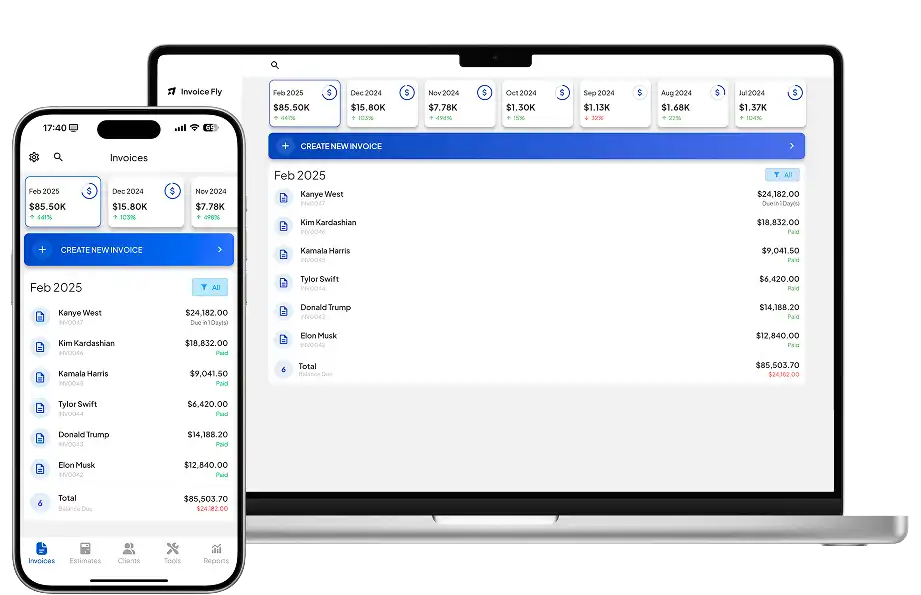
Invoice Fly focuses on the admin around client work, including:
- Estimates and quotes
- Unlimited invoices
- Recurring billing
- Time tracking
- Expenses and receipt capture
- Customer payments
Its invoicing software and estimate and quote software cover the process from pricing a job to billing the customer. Time-tracking software and a receipt scanner app are also included.
Current Invoice Fly pricing is $8.99/week or $98.99/year, with unlimited invoices and estimates.
Invoice Fly isn’t designed to replace Quicken’s personal finance tools or the broader accounting, inventory and payroll functionality available through QuickBooks.
Quicken or QuickBooks: What to take away
Quicken Business & Personal brings personal and business finances together, with tools for budgeting, investments, invoicing, expenses and tax organization.
QuickBooks Online focuses on dedicated business accounting, with more functionality around accounts payable, inventory, multiple users and financial reporting.
For businesses that mainly need to estimate work, track time and expenses, invoice customers and collect payments, Invoice Fly offers a more focused third option.