Wave Alternatives: 8 Best Options for Small Businesses
Table of Contents
Wave gives small businesses a lot without a monthly software bill. Its free Starter plan includes invoicing, estimates, bills and double-entry bookkeeping, so finding a Wave alternative isn’t simply about finding another low-cost invoice app.
You may want more accounting features, built-in time tracking, inventory, project billing or a platform designed around client work. Or you may use Wave mainly for invoicing and want something that fits that part of your business better.
Here are eight Wave alternatives, from invoicing tools for freelancers and contractors to full accounting platforms.
What does Wave offer?

Wave combines invoicing with bookkeeping and accounting tools for small businesses. Its permanent Starter plan is free, which makes it different from many of the paid alternatives in this guide.
Starter includes unlimited invoices, estimates, bills and bookkeeping records, along with mobile invoicing and basic cash-flow and customer-management tools. Wave also uses double-entry accounting and provides reports including profit and loss, balance sheet and cash flow.
For businesses that need more automation, Wave Pro costs $19/month or $190/year. It adds:
- Automatic bank-transaction imports
- Transaction categorization
- Unlimited digital receipt capture
- Expense tracking
- Automated late-payment reminders
- Unlimited account users
- Additional bookkeeping automation
Wave is currently offering Pro at $9.50/month for the first three months for some new customers, but this is a temporary promotion rather than its regular price.
Online payments are available separately, while payroll and Wave Advisors have their own pricing.
Why consider a Wave alternative?
Start with what you use Wave for now and what you want your next platform to do.
- Mostly invoicing? Look for estimates, billable time, expenses, receipts and payment tools.
- Need full bookkeeping? Check for double-entry accounting, bank reconciliation and financial statements.
- Need more as you grow? Inventory, purchase orders, project accounting and advanced reporting may also be worth comparing.
Wave Starter is permanently free, so keep that in mind when comparing prices. A 14- or 30-day free trial isn’t the same as a plan you can continue using for $0.
If invoicing is a priority, our guide to the different types of invoices can help you compare the billing features you need.
Wave alternatives comparison chart
Compare the main features and starting prices of each option below.
| Platform | Main features | Starting price |
|---|---|---|
| Invoice Fly | Estimates, invoices, time, expenses, receipts and payments | $8.99/week or $98.99/year |
| QuickBooks Online | Accounting, invoicing, bills, bank reconciliation and reporting | $38/month |
| Xero | Accounting, invoices, bills, bank reconciliation and reporting | $27/month* |
| FreshBooks | Invoicing, accounting, time tracking and project billing | $23/month |
| Zoho Books | Accounting, invoicing, bank reconciliation and reports | Free for qualifying businesses |
| Sage 50 | Accounting, inventory, job management and reporting | $128.67/month |
| Bonsai | CRM, projects, time tracking and client billing | $9/user/month annually |
| Odoo Accounting | Accounting, invoices, bills, reconciliation and business apps | One App Free available |
Prices checked September 2026. Xero pricing reflects announced U.S. rates effective October 1, 2026.
If you’re looking beyond Wave because of one particular feature, compare that first. Invoice Fly and FreshBooks put more emphasis on client billing and service work. QuickBooks, Xero, Zoho Books, Sage 50 and Odoo provide broader accounting functionality. Bonsai combines client and project management with financial tools.

Best alternatives to Wave
Here’s what each option offers and where it differs from Wave.
1. Invoice Fly
Best for: Contractors, tradespeople and service businesses focused on client billing.
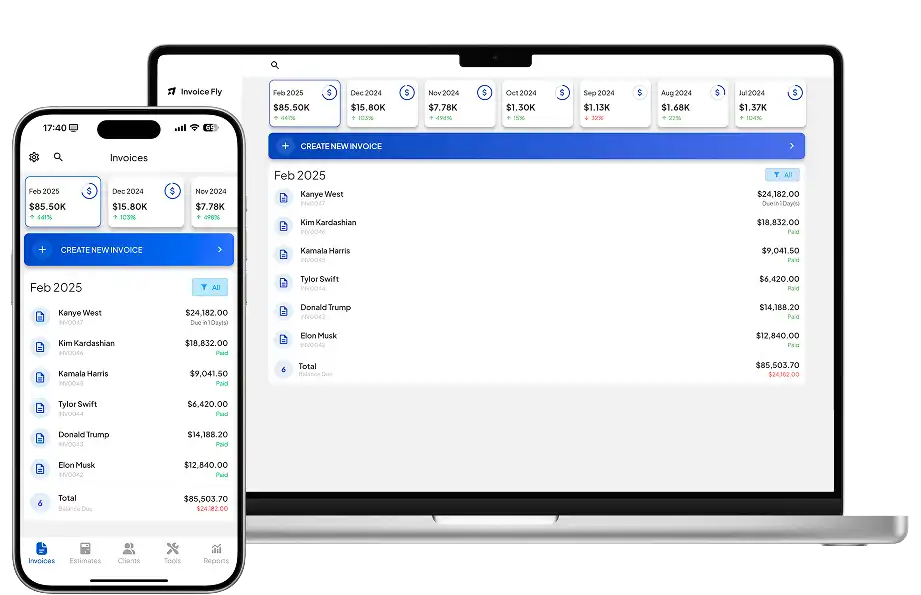
Invoice Fly focuses on the admin around client work, from estimating and tracking time to invoicing and collecting payment.
Features
You can use Invoice Fly’s estimate and quote software to price a job before work begins and convert an approved estimate into an invoice afterwards.
Other features include:
- Unlimited invoices and estimates
- Recurring invoices
- Automatic payment reminders
- Sent, viewed, paid and overdue tracking
- Time tracking
- Billable time-to-invoice conversion
- Expense tracking
- Receipt scanning
- Client management
- Business reports
- Online payments
Its receipt scanner app can keep expense records alongside the rest of your billing admin, while built-in time-tracking software is useful when customers are billed by the hour.
Invoice Fly doesn’t include Wave’s double-entry bookkeeping or bank reconciliation. Businesses using those accounting features would need to consider whether they require separate accounting software.
For the billing side, our guide on how to send an invoice covers the information to include before sending one to a customer.
Pricing
Invoice Fly pricing currently starts at:
- Weekly: $8.99
- Yearly: $98.99
Both options include unlimited invoices and estimates.
Pros and cons
Pros
- Unlimited invoices and estimates
- Built-in time tracking
- Receipt scanning and expense tracking
- Useful for contractor and service-business billing
- Straightforward subscription options
Cons
- No permanent free plan comparable to Wave Starter
- No full double-entry bookkeeping
- Businesses needing bank reconciliation or accountant-focused ledgers may need additional software
You can also find independent Invoice Fly reviews on Capterra.
2. QuickBooks Online
Best for: Small businesses that need more accounting depth and reporting than Wave provides.
QuickBooks Online covers double-entry bookkeeping, invoices, expenses, bills, bank feeds, reconciliation, sales tax and financial reporting.
Higher plans add tools such as inventory, project profitability, budgeting and more advanced reporting and workflows.
Pricing
Regular U.S. prices currently start at:
- Simple Start: $38/month
- Essentials: $85/month
- Plus: $140/month
- Advanced: $340/month
QuickBooks regularly advertises promotional discounts, but these shouldn’t be treated as its standard subscription prices.
Simple Start supports one standard user, Essentials three, Plus five and Advanced up to 25, with accountant access handled separately.
Pros and cons
Pros
- Full accounting and bookkeeping
- Bank reconciliation and reporting
- Inventory and project tools on higher plans
- Wide range of integrations
Cons
- Much more expensive than Wave Starter
- Plan and add-on structure can increase costs
- More functionality than some freelancers need

3. Xero
Best for: Businesses that want cloud accounting with collaboration and no standard per-user license fee.
Xero handles quotes, invoices, bills, bank feeds, reconciliation, sales tax and financial reporting.
It also supports purchase orders and inventory. Established adds features including multi-currency, projects, time and cost tracking, employee expenses, mileage claims and additional analytics.
Pricing
From October 1, 2026, regular U.S. prices are:
- Early: $27/month
- Growing: $59/month
- Established: $97/month
Xero doesn’t charge additional per-user license fees on its standard plans.
Early does have usage limits, including 20 invoices and five bills. Growing removes those basic limits, so businesses moving from Wave’s unlimited free invoicing should take that into account.
Pros and cons
Pros
- Full accounting and bank reconciliation
- No standard per-user license fees
- Inventory and purchase orders
- Project and expense tools on Established
Cons
- Early has invoice and bill limits
- More expensive than Wave Starter
- Projects, multi-currency and employee expenses require Established
4. FreshBooks
Best for: Freelancers and service businesses that combine invoicing with time and project billing.
FreshBooks includes customized and recurring invoices, estimates, online payments, expenses, time tracking, deposits and project billing.
Pricing
Regular U.S. prices are:
- Lite: $23/month
- Plus: $43/month
- Premium: $70/month
- Select: Custom pricing
Temporary discounts are often advertised, but the prices above are the regular rates.
The main restriction is the number of billable clients. Lite supports five, Plus 50 and Premium unlimited clients.
Pros and cons
Pros
- Invoicing and recurring billing
- Built-in time tracking
- Project billing
- Accounting tools available
Cons
- Billable-client limits on Lite and Plus
- Several accounting features require Plus or above
- Additional team members cost extra
For recurring client work, invoice automation can reduce some of the repetitive steps around billing and payment follow-up.

5. Zoho Books
Best for: Small businesses looking for a permanent free accounting option with room to upgrade.
Zoho Books is one of the more direct alternatives to Wave for businesses that want to keep both invoicing and accounting in a free platform.
Its Free plan is available to U.S. businesses with annual revenue of $50,000 or less. It allows up to 1,000 invoices and 1,000 expenses per year.
Features include invoices, quotes, expenses, journals, vendors, mileage, online payments, recurring invoices, bank reconciliation, payment reminders and financial reports.
Pricing
Current prices are:
- Free: $0
- Standard: $20/month or $15/month annually
- Professional: $50/month or $40/month annually
- Premium: $70/month or $60/month annually
- Elite: $150/month or $120/month annually
- Ultimate: $275/month or $240/month annually
Professional is where projects, timesheet billing, project profitability, inventory, purchase and sales orders, multi-currency and retainers are added.
Pros and cons
Pros
- Permanent free plan for qualifying businesses
- Double-entry accounting and bank reconciliation
- Extensive upgrade path
- Broad range of financial reports
Cons
- Free plan has revenue and transaction limits
- Projects and inventory require Professional or above
- Several paid tiers can make plan selection less straightforward
6. Sage 50
Best for: Established businesses that need deeper accounting, inventory and job-management tools.
For U.S. businesses, the relevant current Sage product is Sage 50, rather than the browser-based Sage Accounting plans available in some other countries.
Sage 50 Pro covers invoices, bills, expenses, purchase orders, automated bank reconciliation, inventory, cash flow, reporting and job management.
Premium adds advanced budgeting and inventory, multiple companies, advanced reporting and job costing. Quantum expands the system for larger accounting teams.
Pricing
Current Sage 50 Cloud prices are:
- Pro Accounting: $128.67/month
- Premium Accounting: $182.50/month
- Quantum Accounting: $271.17/month
These plans require a minimum one-year commitment. Sage currently directs prospective users to a test drive or on-demand demo to try Sage 50 before purchasing.
Pros and cons
Pros
- Deep accounting functionality
- Inventory included
- Automated bank reconciliation
- Job management and reporting
Cons
- Considerably more expensive than Wave
- More accounting-heavy than many small businesses require
- Annual commitment applies
7. Bonsai
Best for: Freelancers, consultants and agencies that want projects and client management alongside billing.
Bonsai approaches the problem differently from Wave. Its focus starts with clients and projects rather than bookkeeping.
Basic includes CRM, time tracking, tasks, unlimited projects and unlimited clients. Invoices and payments don’t start until Essentials, which also adds proposals, contracts, scheduling, a client portal and expense and income tracking.
Premium adds project insights, workload management and profitability reporting.
Pricing
Annual prices are:
- Basic: $9/user/month
- Essentials: $19/user/month
- Premium: $29/user/month
- Elite: $49/user/month
Monthly billing is $15, $25, $39 and $59 per user respectively. Bonsai’s current pricing confirms that invoices and payments begin with Essentials rather than Basic.
Pros and cons
Pros
- CRM and project management
- Built-in time tracking
- Contracts, proposals and scheduling from Essentials
- Useful client-management workflow
Cons
- Basic doesn’t include invoices or payments
- Pricing is per user
- Not a replacement for Wave’s full bookkeeping functionality
8. Odoo Accounting
Best for: Businesses that want accounting now but may eventually need a wider business-management system.
Odoo Accounting covers customer invoices, vendor bills, recurring invoices, bank reconciliation, payments, multi-currency, tax reporting, financial statements and budgets.
The wider Odoo suite can add inventory, CRM, projects, timesheets, ecommerce, HR and point-of-sale tools.
Pricing
Odoo has a One App Free plan that provides one app with unlimited users through Odoo Online. Selecting Accounting as that app therefore provides a permanent $0 accounting option.
Current annual prices for the wider suite are:
- One App Free: $0
- Standard: $24.90/user/month
- Custom: $49/user/month
Standard and Custom include all Odoo apps. Custom adds Odoo Studio, multi-company functionality, an external API and additional deployment options.
Pros and cons
Pros
- Accounting can be used as the free single app
- Unlimited users on One App Free
- Full accounting functionality
- Can expand into inventory, CRM and other business tools
Cons
- More complex than Wave
- Paid plans use per-user pricing
- Larger implementations may require additional setup
How to choose a Wave alternative

Start with the reason you’re moving away from Wave.
Decide whether you need invoicing or full accounting
If you use Wave mainly to send estimates and invoices, record expenses and collect payments, you may not need another full bookkeeping platform. Invoice Fly, FreshBooks and Bonsai all put more emphasis on client work and billing, although their accounting capabilities differ.
If you use Wave for double-entry bookkeeping, bank reconciliation and financial statements, look at QuickBooks, Xero, Zoho Books, Sage 50 or Odoo.
The IRS explains the types of business records that may need to be retained, including records supporting income and expenses. Software can help organize those records, but the features you need will depend on how your business handles its finances.
Check the free-plan limits
Wave Starter isn’t a trial. You can continue using its included features without upgrading.
Zoho Books also has a permanent Free plan, but eligibility is limited to businesses with annual revenue of $50,000 or less, and annual invoice and expense limits apply.
Odoo’s One App Free works differently again: you can choose one Odoo application with unlimited users. If you later need the wider suite, paid per-user pricing applies.
Compare those restrictions with your actual workload rather than treating every $0 option as equivalent.
Compare the features you’re missing in Wave
Check which platforms cover the features you need:
- Time tracking: Invoice Fly, FreshBooks and Bonsai include it.
- Inventory: QuickBooks Plus, Xero, Zoho Books Professional and Sage 50 are among the options to check.
- Project billing: FreshBooks, Xero Established and Zoho Books Professional provide project-related tools.
- Bank reconciliation: QuickBooks, Xero, Zoho Books, Sage 50 and Odoo support it.
- Client/project management: Bonsai puts more emphasis on this area.
- Simple contractor billing: Invoice Fly focuses on estimates, time, expenses, invoices and payments.
If getting paid on time is part of the problem, review your invoice payment terms and invoice due date alongside any reminder or automation features.
Check what can move from Wave
Accounting migrations need more planning than transferring a list of customer names.
Before cancelling Wave, identify the records you need to preserve. These may include:
- Customers and vendors
- Products and services
- Invoices and bills
- Payments and transactions
- Chart of accounts
- Account balances
- Receipts
- Financial reports
Import options vary. Some platforms support CSV imports, while others may offer migration services, accountant assistance or third-party conversion tools.
Check what the replacement platform can import before cancelling Wave, and keep exports or archives of any financial records you need.
Look at integrations and the total cost
Check whether the replacement needs to connect with payroll, payment providers, ecommerce platforms, your accountant’s software or other business tools.
Also compare the plan you’ll actually need rather than the lowest advertised price. Features such as inventory, projects, additional users or payroll may require a higher tier or separate add-on.
The SBA provides broader guidance on managing business finances and operations. Your software choice should fit the way you currently invoice, record expenses, manage accounts and work with financial professionals.