Jobber Alternatives: 8 Best Options for Field Service Businesses
Table of Contents
Jobber is built for businesses that manage work in the field, from booking a customer to scheduling the job, sending a technician and collecting payment. But not every contractor needs that entire system, and growing teams may need different tools as their operations become more complex.
The best Jobber alternatives therefore range from straightforward invoicing apps to complete field-service-management platforms. The right choice depends on whether you mainly need help with estimates and billing or also need scheduling, dispatch, GPS, inventory and technician management.
This guide looks at eight alternatives to Jobber and where each one fits.
Jobber alternatives: An overview

Jobber is field-service-management software for contractors and home-service businesses. It combines customer management with tools for running jobs in the field.
Depending on the plan, features include:
- Quotes, invoices and payments
- Scheduling and recurring jobs
- Online booking
- Time and expense tracking
- Routing and job costing
- Lead management and automated workflows
- QuickBooks integration
Its app gives field teams access to job details and time tracking, while the client hub lets customers review quotes and appointments, view invoices and make payments.
Jobber also offers tools for capturing and following up with leads, including online booking, request forms, websites and Pipeline. These can help businesses manage potential customers, but Jobber doesn’t directly provide or guarantee new customers.
Why consider a Jobber alternative?
Jobber covers a lot of the day-to-day work involved in running a field-service business, but you may not need every part of the system.
A solo contractor might mainly use estimates, invoices, time and expense tracking. Once you’re managing several technicians, features such as dispatching, GPS, route planning, inventory and service agreements become more useful.
Price will also depend on the plan and team size. Jobber doesn’t have a permanent free plan, but it currently offers a 14-day trial with no credit card required.
Current annual prices start at:
- Core: $29/month for one user
- Connect: $99/month
- Grow: $149/month
- Plus: From $399/month
Jobber also offers no-commitment monthly billing at higher rates. Prices can vary by team size, so check the current plan price for the number of users you need.
Before comparing alternatives, make a list of the Jobber features you actually use. If most of them relate to quoting and billing, our guide to the different types of invoices can help you work out what you need from your next invoicing setup.
Jobber alternatives comparison chart
Field-service software varies considerably in scope. Here’s a quick look at the eight options covered below.
| Platform | What it covers | Starting price |
|---|---|---|
| Invoice Fly | Estimates, invoices, time, expenses, receipts and payments | $8.99/week or $98.99/year |
| Housecall Pro | Scheduling, dispatch, booking, invoicing, payments and field teams | $59/month annually |
| ServiceTitan | Advanced field operations, price books, reporting, inventory and job costing | Custom quote |
| FieldEdge | Dispatch, scheduling, price books, service agreements and QuickBooks | Custom quote |
| Workiz | Scheduling, jobs, communications, automations and payments | Custom quote |
| Service Fusion | Scheduling, dispatch, invoicing and team management | $208/month annually |
| Kickserv | Scheduling, invoicing, time, expenses and QuickBooks | $19/month |
| FieldPulse | Dispatch, work orders, projects, automation and mobile field work | Custom quote |
Prices checked September 2026. Custom-priced platforms require a current quote based on your business and selected features.
Before comparing plans, decide which field-service tools you actually need. If you’re managing technicians, features such as scheduling, dispatch, GPS and inventory may be important. If you work independently, your priorities may be closer to quoting, invoicing, time, expenses and payments.

Best alternatives to Jobber
Here’s how eight Jobber alternatives compare for different service-business needs.
1. Invoice Fly
Best for: Solo contractors and smaller service businesses that don’t need a full dispatch system.
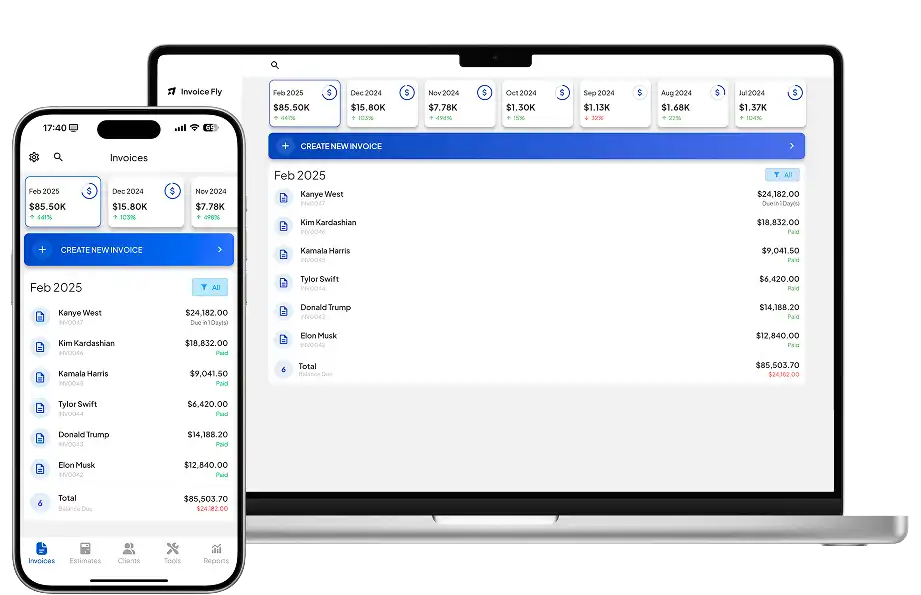
Invoice Fly keeps the workflow around the admin that happens before, during and after a job: estimating, tracking time and expenses, invoicing and collecting payment.
Features
Its invoicing software lets you prepare an estimate, convert it into an invoice, collect payment and keep track of what’s still outstanding.
You also get:
- Unlimited invoices and estimates
- Recurring invoices
- Automatic payment reminders
- Invoice status tracking
- Built-in time-tracking software
- Expenses and receipt capture
- Client records
- Business reports
- Mobile and browser access
Online payments can be accepted through connected providers including Stripe and PayPal.
Invoice Fly doesn’t include Jobber-style dispatching, technician routing, fleet GPS or advanced inventory. It’s aimed at contractors who mainly need to manage estimates, time, expenses, invoices and payments.
Our guide on how to send an invoice covers the information to include when billing customers.
Pricing
Invoice Fly currently costs:
- $8.99/week
- $98.99/year
Both Invoice Fly pricing plans include unlimited invoices and estimates.
Pros and cons
Pros
- Straightforward pricing
- Unlimited invoices and estimates
- Time, expenses, receipts and payments in one place
- Suitable for owner-operators and small service businesses
Cons
- No full dispatch or routing system
- Not designed for larger fleets requiring advanced scheduling, inventory or technician management
Independent Invoice Fly reviews on Capterra provide additional user feedback.
2. Housecall Pro
Best for: Home-service teams looking for scheduling, dispatch and customer-management tools.
Housecall Pro is much closer to Jobber in scope. Its Basic plan already covers online booking, scheduling and dispatch, estimates, invoices, payments, a price book and job costing.
Pricing
Current annual prices start at:
- Basic: $59/month for one user
- Essentials: $149/month for five users
- MAX: $299/month for eight users
Monthly billing costs $79, $189 and $329 respectively. Extra users can add to the cost on Essentials and MAX.
Housecall Pro also offers a 14-day trial with no credit card required.
Pros
- Scheduling and dispatch included
- Online booking and field-team tools
- Routes, GPS and QuickBooks Online sync on Essentials
- MAX adds recurring service plans and route optimization
Cons
- Cost increases as teams and feature requirements grow
- Several operational tools require higher plans
3. ServiceTitan
Best for: Established trade businesses with more complex field operations.
ServiceTitan covers dispatching, scheduling, call booking, invoicing and price books, with higher packages extending into reporting, payroll workflows, commissions and memberships.
It also supports inventory, job costing and accounting integrations including QuickBooks, Xero and Sage Intacct.
Pricing
ServiceTitan doesn’t currently publish dollar prices. Pricing is custom and based on technicians, with Starter, Essentials and The Works packages.
That means businesses need a current quote rather than relying on old online estimates.
Pros
- Extensive field-service functionality
- Inventory and job costing
- Advanced reporting
- Service agreements and accounting integrations
Cons
- No public dollar pricing
- More setup and operational complexity than lightweight options
- May be excessive for a solo contractor primarily looking for estimates and invoices
4. FieldEdge
Best for: Multi-truck businesses that rely on dispatch, price books and QuickBooks.
FieldEdge combines office dispatch with technician workflows. Select includes booking and scheduling, dispatching, quotes, service agreements, customer management, a price book, invoices, payments and technician time tracking.
QuickBooks Online and Desktop integration is also central to the platform.
Pricing
FieldEdge uses custom quote pricing. Its plans are Select, Premier and Elite, and pricing can vary with team size and add-ons.
Mobile licenses also differ by plan: Select currently includes two, Premier four and Elite six.
Pros
- Strong dispatch functionality
- QuickBooks Online and Desktop integration
- Price books and service agreements
- Built for multi-truck operations
Cons
- No public dollar pricing
- Mobile-license allowances vary by plan
- Inventory and other advanced features require higher tiers or add-ons

5. Workiz
Best for: Growing field-service teams that want scheduling, communication and automation.
Workiz brings jobs, scheduling, estimates, invoices, online payments and customer records together, with QuickBooks integration and built-in reporting.
Its Standard plan currently includes unlimited jobs, invoices, estimates and clients. Pro adds more automation and AI-assisted lead and scheduling tools, while Ultimate expands into inventory, service plans, proposals, purchase orders and API access.
Pricing
Standard, Pro and Ultimate currently use custom quote pricing.
Workiz offers a seven-day trial with no credit card required.
Pros
- Unlimited core job and billing records
- Scheduling and customer communication
- Automation and AI tools
- Higher tiers support inventory and service plans
Cons
- No public subscription prices
- Advanced functionality is spread across plans and optional products
- Wider operational system than some small contractors need
For businesses automating repeat admin, our guide to invoice automation explains how billing automation can reduce manual work.
6. Service Fusion
Best for: Field-service teams that prefer flat software pricing with unlimited users.
Service Fusion takes a different pricing approach from many field-service platforms: all three plans include unlimited users.
Starter covers customer management, estimates, jobs, scheduling, dispatch, invoicing, payments, QuickBooks integration and reporting. Plus introduces inventory and job costing, while Pro adds features including e-signatures, a customer portal, recurring invoicing and an API.
Pricing
Annual pricing is currently:
- Starter: $208/month
- Plus: $325/month
- Pro: $533/month
Month-to-month prices are $245, $382 and $627 respectively.
GPS fleet tracking and some other products are sold separately.
Pros
- Unlimited users on every plan
- Scheduling and dispatch
- QuickBooks integration
- Flat subscription pricing rather than per-user charges
Cons
- High starting cost for solo businesses
- Inventory and job costing require Plus
- GPS fleet tracking costs extra
7. Kickserv
Best for: Small and midsize field-service teams looking for clear user-based tiers.
Kickserv combines scheduling and jobs with estimates, invoices, payments, time tracking and customer communication.
Its Start plan includes up to five users, time and expense tracking, reports and QuickBooks Online integration. Run increases the allowance to 10 users and adds dispatch mapping and GPS check-ins. Scale supports up to 20 users and adds further customization.
Pricing
Kickserv’s Flex plan starts at $19/month for smaller teams. Its main paid tiers are:
- Start: $60/month
- Run: $119/month
- Scale: $199/month
Annual subscriptions currently save 20%, and Start, Run and Scale come with a 30-day trial.
Pros
- Published pricing and user allowances
- Time and expense tracking
- Scheduling, invoices and payments
- QuickBooks integration
Cons
- Dispatch mapping and GPS require Run
- Some integrations carry additional charges
- Less operational depth than enterprise-oriented systems
Clear invoice payment terms and an agreed invoice due date remain useful regardless of which field-service platform handles the invoice.
8. FieldPulse
Best for: Growing trade businesses that want configurable field and technician workflows.
FieldPulse covers customer management, scheduling and dispatch, work orders, estimates, invoices, project management and workflow automation.
Its mobile setup also distinguishes between full-access and field-only seats. Field-only access is intended for technicians working with assigned jobs, notes, files and clock-in/out tools.
Pricing
FieldPulse uses custom seat-based pricing across Essentials, Professional and Enterprise. The price depends partly on the access required for each seat.
Premium products can add functionality such as communications, AI tools, price books, financing and fleet tracking.
Pros
- Scheduling and dispatch
- Mobile technician workflows
- QuickBooks integration
- Different seat types for office and field users
Cons
- No public dollar pricing
- Premium products can increase total cost
- A sales quote is required to compare costs accurately
How to choose a Jobber alternative

A useful way to narrow the list is to map what happens from the moment a customer contacts you until the job is paid.
Start with how work reaches the field
If you work alone, scheduling may be as simple as managing your own calendar. In that case, estimates, time tracking, expenses, invoices and payments may matter more than a dispatch board.
Once several technicians are working at different locations, the requirements change. You may need to assign jobs, see technician availability, manage routes, record field updates and keep the office informed.
Housecall Pro, ServiceTitan, FieldEdge, Workiz, Service Fusion, Kickserv and FieldPulse all provide field-management functionality at different levels. Invoice Fly is the lighter option when that layer isn’t required.
Identify the field tools you actually use
Don’t treat “field-service management” as one feature. Consider whether your business needs:
- Scheduling and dispatch
- Technician GPS or route planning
- Time tracking
- Recurring jobs or service agreements
- Inventory or equipment tracking
- Job costing
- Price books
- Online booking
- Customer portals
- QuickBooks integration
Check the plan level too. A platform may advertise a feature that only becomes available on a higher tier or as a paid add-on.
Compare pricing based on your team
Compare the cost for the number of people who actually need access.
Housecall Pro and Kickserv include set numbers of users in different plans. Service Fusion includes unlimited users. FieldPulse uses seat-based custom pricing, while ServiceTitan prices around technicians. FieldEdge and Workiz require quotes.
Include add-ons, payment-processing costs, required integrations and annual-billing commitments when comparing the total.
For financial records, the IRS recommends keeping documents that support business income and expenses. Whichever software you choose, make sure you can retain the records your business needs.
Plan how you’ll move your existing Jobber data
Switching platforms can involve more than exporting a customer list.
Before cancelling Jobber, identify the records you need to keep or move. These may include:
- Clients and leads
- Quotes
- Jobs and work orders
- Invoices and payments
- Products and services
- Notes and attachments
- Recurring jobs
- Employee and time records
Migration options vary by provider, so check the destination platform’s import tools and onboarding support first. Keep exports or backups of important records rather than assuming everything will transfer automatically.
Check integrations and day-to-day usability
Think about what needs to connect to your field-service software. QuickBooks integration is common in this category, but availability can depend on the product, plan or version of QuickBooks you’re using.
The mobile experience matters too. Technicians may need to view job details, record time, add photos, update work orders or collect customer approval without returning to the office.
The SBA provides broader guidance on managing business operations. Before switching software, check that the option you choose works with the tools your business already uses and covers the tasks your team handles every day.