QuickBooks Alternatives: 8 Best Options for Small Businesses
Table of Contents
QuickBooks is one of the best-known names in small-business accounting, but it isn’t the only option. The right QuickBooks alternative depends on what you actually need to manage, from straightforward invoicing to full bookkeeping, inventory and financial reporting.
A contractor who mainly sends estimates, tracks job expenses and invoices customers has very different needs from a growing business managing supplier bills, inventory and bank reconciliation. That means there isn’t one QuickBooks competitor that makes sense for everyone.
This guide covers eight QuickBooks alternatives for different budgets and workflows, including Invoice Fly, Xero, FreshBooks, Zoho Books, Wave, Sage 50, Bonsai and Odoo.
QuickBooks alternatives: An overview

Before comparing alternatives, it helps to be clear about what you’re replacing.
QuickBooks Online is a full accounting platform. Depending on the plan, businesses can use it for invoicing, expenses, bank feeds, reconciliation, bills, financial reports and wider accounting tasks.
QuickBooks Desktop is different. In the U.S., Intuit no longer sells new subscriptions to QuickBooks Desktop Pro Plus, Premier Plus or Mac Plus. Existing subscribers can continue renewing eligible subscriptions, while QuickBooks Desktop Enterprise remains available to new customers.
So, a good QuickBooks replacement doesn’t necessarily need every QuickBooks feature. It needs to cover the parts your business actually uses.
Why consider a QuickBooks alternative?
There are several reasons you might look at other options.
You may want:
- A simpler tool focused mainly on invoicing and getting paid
- A permanent free plan for basic bookkeeping
- Different pricing as your business grows
- Better tools for freelancers, contractors or project-based work
- More advanced inventory or ERP features
- A platform that fits your existing apps and accountant workflow
Start by listing the QuickBooks features you currently use. If that’s mostly estimates, invoices, payments and expenses, you may not need another full accounting suite. If you rely on bank reconciliation, accounts payable, inventory and detailed financial statements, look more closely at full accounting alternatives.
The different types of invoices you send can also help determine how sophisticated your billing software needs to be.
QuickBooks alternatives comparison chart
Here’s how the eight options compare at a glance.
| Platform | Best for | Key features | Starting price |
|---|---|---|---|
| Invoice Fly | Contractors and service businesses | Invoices, estimates, payments, time and expenses | $8.99/week or $98.99/year |
| Xero | Full cloud accounting | Reconciliation, bills, reports, inventory | $27/month* |
| FreshBooks | Freelancers and service businesses | Invoicing, time, expenses, accounting | $23/month |
| Zoho Books | Low-cost full accounting | Accounting, reconciliation, projects, inventory | Free for eligible businesses, Standard plan $20/month |
| Wave | Solopreneurs and microbusinesses | Basic bookkeeping and invoicing | Free, $19/month for PRO plan |
| Sage 50 | Established accounting workflows | Accounting, inventory, bills, jobs, reports | $128.67/month |
| Bonsai | Agencies and consultants | CRM, projects, contracts, time and billing | $15/user/month |
| Odoo Accounting | ERP and customizable workflows | Accounting plus wider business apps | Free for one app, Standard Plan from $24.90/user/month |
Prices checked September 2026. Xero pricing reflects announced U.S. rates effective October 1, 2026.
These aren’t eight versions of the same software. Xero, Zoho Books, Sage 50 and Odoo offer broader accounting functionality. Invoice Fly focuses more directly on invoicing and service-business billing. FreshBooks, Wave and Bonsai sit at different points between those two approaches.
For freelancers, contractors and tradespeople who mainly need to quote jobs, invoice customers, track expenses and billable time, Invoice Fly is designed around those tasks. Businesses looking to replace a wider QuickBooks accounting setup should compare the accounting-focused platforms more closely.

Best alternatives to QuickBooks
1. Invoice Fly
Best for: Freelancers, contractors, tradespeople and service businesses focused on client billing.
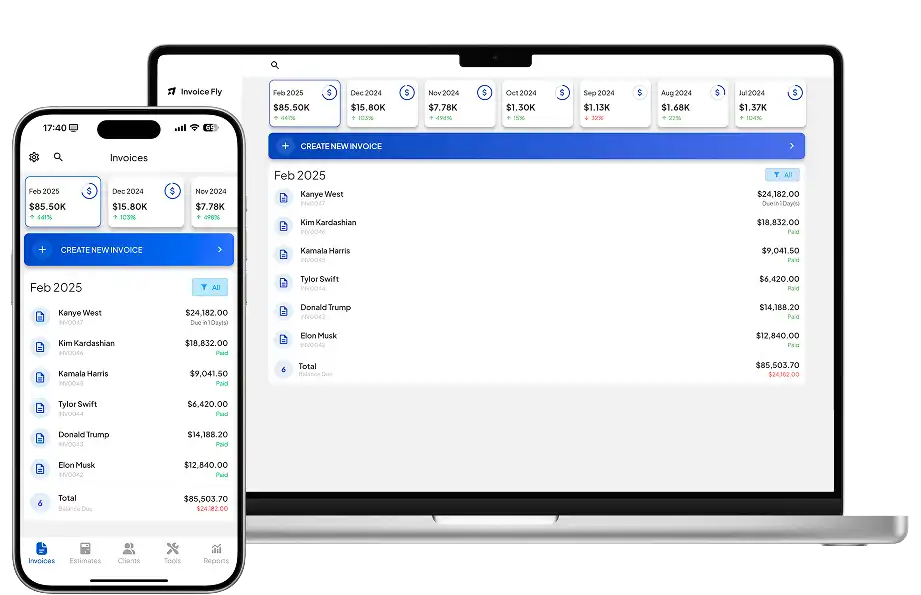
Invoice Fly takes a more focused approach than QuickBooks. Rather than building a full accounting suite around bookkeeping, payroll and inventory, its invoicing software brings together the everyday tasks involved in quoting work and getting paid.
Features
You can create unlimited invoices and estimates, turn approved estimates into invoices, schedule recurring billing and track whether invoices have been viewed or paid.
It also includes:
- Estimate and quote software
- Online payments through providers including Stripe and PayPal
- Automatic payment reminders
- Built-in time tracking
- Expense tracking and receipt scanning
- Business reports
- Client management
- Mobile and browser access
That makes Invoice Fly particularly relevant if the parts of QuickBooks you use most are estimates, invoices, payments and expenses rather than full double-entry accounting.
If you’re moving from accounting software to a more focused billing setup, our guide on how to send an invoice covers the details to include when billing a customer.
Pricing
Invoice Fly has two main subscription options:
- Weekly: $8.99/week
- Yearly: $98.99/year
Both Invoice Fly pricing plans include unlimited invoices and estimates.
Pros and cons
Pros
- Unlimited invoices and estimates
- Built around contractor and service-business billing
- Time, expenses, receipts and payments in the same workflow
- Simple two-option pricing structure
Cons
- Not a full QuickBooks-style accounting suite
- Businesses needing payroll, inventory or advanced bookkeeping may need additional software
You can also read independent Invoice Fly reviews on Capterra.
2. Xero
Best for: Small businesses looking for a broad cloud-accounting alternative to QuickBooks Online.
Xero is one of the closer alternatives in this list if you’re replacing QuickBooks for accounting rather than simply invoicing.
Features
Xero covers invoices, quotes, bills, bank reconciliation, financial reports, sales tax and online payments. Higher plans add features such as projects, multi-currency accounting, employee expenses and deeper analytics.
Unlike several competitors, Xero’s standard U.S. plans don’t charge a separate license fee for each user.
Pricing
From October 1, 2026, Xero’s U.S. prices are:
- Early: $27/month
- Growing: $59/month
- Established: $97/month
Early limits businesses to 20 invoices and five bills. Growing removes those limits, while Established adds more advanced features.
Pros
- Full double-entry accounting
- Strong bank reconciliation and reporting
- No standard per-user license fee
- Broad integration ecosystem
Cons
- Early has invoice and bill limits
- Projects and multi-currency require Established
- More accounting functionality than some freelancers need
3. FreshBooks
Best for: Freelancers and service businesses that want invoicing plus accounting.
FreshBooks sits closer to the service-business side of accounting software. It combines client billing with time tracking, expenses and project tools while still providing double-entry accounting features on higher plans.
Features
All main plans include invoices, estimates, expenses, recurring invoices, time tracking, automated bank imports and online payments.
Plus introduces accounting reports, bank reconciliation and accountant access. Premium adds features such as accounts payable and project profitability.
Pricing
Regular U.S. monthly prices are:
- Lite: $23/month for up to five billable clients
- Plus: $43/month for up to 50 billable clients
- Premium: $70/month with unlimited billable clients
- Select: Custom pricing
FreshBooks frequently runs introductory promotions, so compare the regular renewal price rather than choosing based only on the initial discount.
Pros
- Strong invoicing and project billing
- Built-in time and expense tracking
- Double-entry accounting available
- Designed with service businesses in mind
Cons
- Client limits on Lite and Plus
- Some accounting features require higher tiers
- Extra team members cost more
4. Zoho Books
Best for: Small businesses that want affordable full accounting, particularly existing Zoho users.
Zoho Books combines a relatively low entry price with a wide accounting feature set.
Features
Its tools cover invoices, expenses, bank reconciliation, financial reports and customer portals. As you move through the plans, you can add timesheet billing, project profitability, purchase and sales orders, inventory, multi-currency accounting and more advanced automation.
The number of plans means there’s plenty of room to scale, although it also means you’ll need to check which tier includes the features you need.
Pricing
Zoho Books offers a permanent Free plan for qualifying U.S. businesses with annual revenue below its stated $50,000 threshold.
Paid plans range from Standard through Ultimate, with Standard starting at $20/month or $15/month when billed annually.
Pros
- Free plan for qualifying businesses
- Broad accounting capabilities
- Strong range of features for the price
- Integrates with the wider Zoho ecosystem
Cons
- Six paid/free tiers can make plan selection less straightforward
- Inventory, multi-currency and some project tools require higher plans
5. Wave
Best for: Solopreneurs and very small businesses looking for basic bookkeeping and invoicing.
Wave is one of the most accessible free alternatives to QuickBooks.
Features
The Starter plan includes unlimited estimates, invoices, bills and bookkeeping records, plus the option to accept online payments.
Pro adds automatic bank imports, transaction categorization, unlimited receipt capture and automated late-payment reminders.
Payroll and hands-on bookkeeping support are separate paid services.
Pricing
- Starter: $0
- Pro: $19/month or $190/year
Wave currently promotes a temporary discount on the first three months of Pro, but the figures above are its regular subscription prices.
Pros
- Permanent free Starter plan
- Unlimited invoicing and bookkeeping records
- Straightforward option for microbusinesses
- Integrated online payments
Cons
- Automated bank imports require Pro
- Payroll and some other services cost extra
- Less suited to complex inventory or advanced accounting workflows
If late payments are a recurring issue regardless of the software you choose, setting clear invoice payment terms and an invoice due date can make expectations clearer from the start.

6. Sage 50
Best for: Businesses that want established accounting software with inventory and job-management tools.
For U.S. readers, there’s an important naming distinction here. Sage’s browser-based Sage Accounting plans advertised in some countries shouldn’t be confused with the current U.S. offering.
In the U.S., Sage currently promotes Sage 50 Cloud and Sage 50 Desktop.
Features
Sage 50 includes invoices, bills, expenses, bank reconciliation, reporting, inventory, cash-flow management and job management. Higher tiers add more advanced inventory, budgeting and multi-company features.
This puts it much closer to traditional accounting software than an invoice-focused app.
Pricing
Sage 50 Cloud Pro Accounting currently starts at $128.67/month for one user, with a minimum one-year commitment.
That puts its starting price above the other options in this roundup and reflects its position as a broader accounting product rather than an invoice-focused tool.
Pros
- Strong accounting depth
- Inventory and job management
- Bank reconciliation and reporting
- Established accounting ecosystem
Cons
- Higher starting price
- May be more software than freelancers or invoice-focused businesses need
- U.S. product options differ from Sage offerings in other countries
7. Bonsai
Best for: Freelancers, consultants and agencies that want client and project management alongside billing.
Bonsai approaches the problem from the client-work side rather than traditional accounting.
Features
Basic includes time tracking, tasks, CRM, unlimited projects and unlimited clients. However, invoicing and payments start with Essentials, which also adds proposals, contracts, forms, scheduling, a client portal and expense tracking.
Premium adds project insights, workload tools and profitability reporting, while Elite adds more advanced team controls.
Pricing
Monthly prices currently start at:
- Basic: $15/user
- Essentials: $25/user
- Premium: $39/user
- Elite: $59/user
Annual billing reduces those rates. Bonsai also offers a seven-day trial.
Pros
- Strong client and project workflow
- Contracts, CRM, scheduling and billing in one platform
- Useful tools for agencies and consultants
- Built-in time tracking
Cons
- Basic doesn’t include invoicing or payments
- Pricing is per user
- Less accounting-focused than Xero or Zoho Books
8. Odoo Accounting
Best for: Businesses that want accounting inside a wider ERP and business-management system.
Odoo is the broadest platform in this list. Accounting is one part of a suite that can also cover CRM, inventory, ecommerce, projects, HR, point of sale and other business functions.
Features
Odoo Accounting supports customer invoices, vendor bills, recurring invoices, bank feeds, reconciliation, taxes, online payments, multi-currency and financial reports.
The wider Odoo ecosystem is what makes it different. A growing business can add operational tools without moving to an entirely separate platform.
Pricing
Odoo’s One App Free plan costs $0 and allows one Odoo app with unlimited users. A business choosing Accounting as its single app can therefore use it without a software subscription fee.
Paid annual pricing currently starts at:
- Standard: $24.90/user/month
- Custom: $49/user/month
Standard and Custom include all Odoo apps. Custom adds features such as Odoo Studio, external API access and additional deployment options.
Pros
- One App Free can make Accounting free for unlimited users
- Broad accounting and ERP capabilities
- Can expand into CRM, inventory, projects and other areas
- Strong customization options
Cons
- Wider and potentially more complex than a simple invoicing tool
- Paid plans charge per user
- Advanced customization requires Custom
How to choose a QuickBooks alternative
The longest feature list isn’t necessarily the best fit. Start with the financial tasks you actually need to complete each week.
Consider your accounting requirements
First, decide whether you need accounting software or primarily invoicing software.
If your workflow revolves around creating estimates, tracking time and expenses, invoicing customers and collecting payments, Invoice Fly or another service-focused tool may cover the work you do most often.
If you also need a chart of accounts, bank reconciliation, accounts payable, inventory and detailed financial statements, look at broader accounting platforms such as Xero, Zoho Books, Sage 50 or Odoo.
The IRS recommends maintaining records that support business income and expenses, including invoices, receipts and other financial documents. How sophisticated your software needs to be depends on the records and financial processes your business manages.
Compare features and pricing
Don’t compare subscription prices without checking what each plan includes.
A free plan can be excellent if it covers your needs, but limits on clients, projects, bank feeds or automation can change the comparison. Similarly, a low starting price may not include the accounting, invoicing or team features you actually need.
For businesses sending invoices regularly, features such as invoice automation can also reduce repetitive admin.
Check how your QuickBooks data can be transferred

Switching software may also mean moving years of financial records. The migration process varies by platform and can involve CSV exports, built-in import tools, specialist migration services or help from an accountant.
Before choosing a replacement, check which QuickBooks records it can import. Depending on your business, that may include:
- Customers and vendors
- Chart of accounts
- Invoices and bills
- Products and services
- Bank transactions
- Opening balances
- Historical reports
Keep an export or archive of any records you need before closing your QuickBooks account. Don’t assume every platform can transfer everything automatically.
Check integrations and ease of use
Think about the software you already use. Your accountant may prefer a particular accounting platform, while your payroll, payment, ecommerce or CRM tools may also need to connect with it.
Ease of use matters too. A sophisticated accounting platform can be useful when you need its capabilities, but more features can also mean more setup and complexity.
The SBA provides broader guidance on managing business finances and operations. When comparing QuickBooks alternatives, focus on the tools your business uses regularly, the features you may need as you grow and how easily the software fits into your existing workflow.
FAQs
1. What is the best alternative to QuickBooks?It depends on what you need. Invoice Fly focuses on invoicing and client billing, while Xero, Zoho Books, Sage 50 and Odoo offer broader accounting tools.
2. Is there a free alternative to QuickBooks?Yes. Wave has a free Starter plan, while Zoho Books and Odoo offer free options with specific eligibility or usage conditions.
3. Is Invoice Fly better than QuickBooks?They serve different needs. Invoice Fly focuses on estimates, invoices, payments, time and expenses, while QuickBooks provides broader accounting functionality.
4. Can I transfer my QuickBooks data to another accounting software?Usually, but what you can transfer depends on the new platform. Check its migration and import options before cancelling QuickBooks.
5. What should I look for in QuickBooks alternative software?Compare the features you actually use, such as invoicing, expenses, bank reconciliation, reporting, inventory, payroll, time tracking and integrations. Also check plan limits and total cost.