10 Best Receipt Software Tools for Easier Expense Tracking
Table of Contents
Receipts have a habit of piling up fast, especially when you’re busy running a business. The best receipt software gives you a simple way to scan, organize, and track them before they get lost, while some tools can also pull out expense details automatically and sync them with your bookkeeping.
In this guide, we compare 10 of the best receipt scanner apps and software tools for 2026, looking at what each one does well, where it falls short, and how much it costs.

Why Do Businesses Need Receipt Software?
Receipts provide a record of what your business spent, but paper receipts are easy to lose and time-consuming to organize manually. Receipt software gives you a more consistent way to capture expenses as they happen and keep the records searchable.
Good recordkeeping also matters at tax time. The IRS notes that good business records help you monitor your business, prepare financial statements, and track deductible expenses.
If you want a closer look at the document itself, start with our guide to what a receipt is.
What to Look for in Receipt Software
The right receipt software should fit the way you already manage expenses. A freelancer scanning a handful of receipts each month will have very different needs from a business collecting receipts from several employees.
Here are the main things to compare:
- Receipt capture: Can you scan receipts with your phone, upload files, or forward digital receipts by email?
- OCR: Can the software automatically pull out details such as the merchant, date, total, and tax?
- Organization: Is it easy to search, categorize, and find receipts later?
- Expense tracking: Can you connect receipts to expenses or create expense reports?
- Integrations: Does it work with the accounting or bookkeeping software you already use?
- Team features: Can employees submit receipts and managers review or approve expenses?
- Price: Does the plan make sense for the number of receipts and users you need to manage?
For most small businesses, the best option is not necessarily the one with the longest feature list. It is the one that makes receipts easier to capture, organize, and use without adding another complicated system to your workflow.

10 Best Receipt Scanner Apps and Software Tools for 2026
Here is a quick comparison before we look at each tool in more detail.
| Receipt software | Best for | Free option | Starting price* |
|---|---|---|---|
| InvoiceFly | Freelancers, contractors, and service businesses | Free trial/start option | $8.99/week or $98.99/year |
| Expensify | Teams and employee expenses | Limited individual plan | $5/member/month |
| Shoeboxed | Paper receipt backlogs | No ongoing free plan | From $9/month |
| Smart Receipts | Simple receipt and expense reports | Yes | Paid plans available |
| Wave | Small-business accounting | Free accounting plan | Receipt scanning from $8/month |
| QuickBooks Online | Accounting integration | No ongoing free plan | From $38/month |
| Zoho Expense | Budget-conscious teams | Yes | Free for up to 3 users |
| Dext Prepare | Automated bookkeeping workflows | Free trial | From $25.21/month billed annually |
| Adobe Scan | Free document and receipt scanning | Yes | Free |
| Genius Scan | Mobile document scanning | Yes | Ultra $39.99/year |
Pricing can change and may vary by billing cycle, region, features, or number of users.
1. InvoiceFly
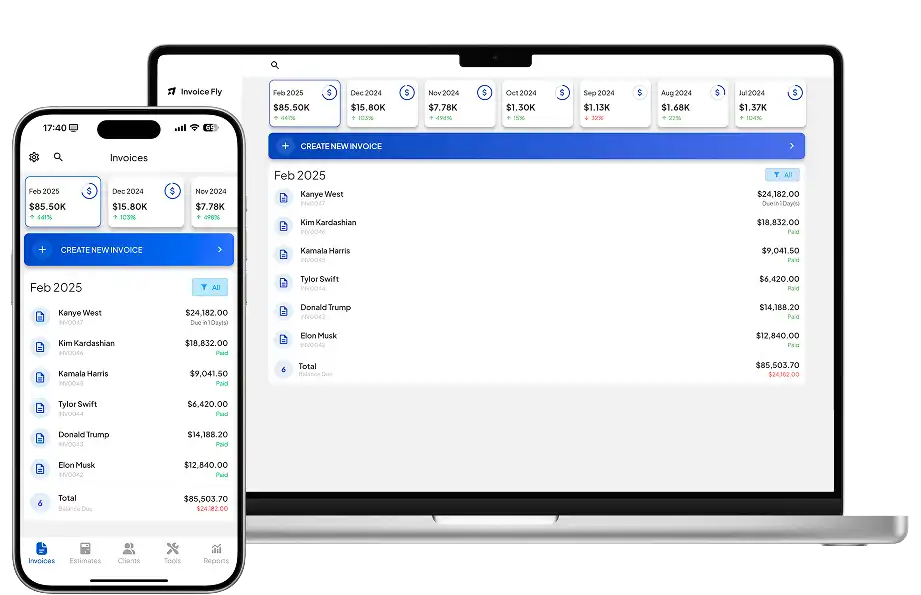
Best for: Freelancers, contractors, and small service businesses
InvoiceFly combines receipt scanning with expense tracking, invoicing, estimates, payments, and business reporting. Its receipt scanner app lets you capture business receipts from your phone and add expenses to your records, making it useful if you want receipt management without adopting a full accounting platform.
Pros: Simple mobile workflow, receipt scanning alongside invoicing and expense reporting, built for small businesses and contractors.
Cons: Larger companies may need more advanced approval or accounting workflows.
Price: $8.99/week or $98.99/year.
2. Expensify
Best for: Employee expenses and reimbursements
Expensify is a strong choice for businesses with employees submitting regular expenses. Its SmartScan technology extracts receipt details and connects them to expense reports, while paid plans add corporate cards, approvals, policies, and reimbursements.
Pros: Strong receipt automation, good team workflows, useful expense policies and reimbursements.
Cons: More functionality than many freelancers or very small businesses need.
Price: Free individual plan available. Collect starts at $5/member/month.
3. Shoeboxed
Best for: Businesses with a backlog of paper receipts
Shoeboxed stands out because you do not have to scan everything yourself. Its Magic Envelope service lets you mail in physical receipts for digitization on eligible plans, alongside regular digital uploads.
Pros: Good for paper-heavy businesses, mail-in scanning options, accounting integrations on supported plans.
Cons: More expensive than basic mobile scanning apps if you only need occasional receipt capture.
Price: From $9/month or $97/year. Pro costs $29/month and includes more receipt scans, accounting integrations, and quarterly Magic Envelope access.
4. Smart Receipts
Best for: Straightforward receipt tracking and expense reports
Smart Receipts focuses on scanning and organizing receipts without requiring a full accounting platform. Users can track receipt data and create PDF and CSV expense reports.
Pros: Free option available, straightforward expense tracking, useful reporting tools.
Cons: Less suitable for businesses needing full accounting or employee reimbursement workflows.
Price: Free tier available, with paid subscription options for additional features.
5. Wave
Best for: Small businesses that want receipts and accounting together
Wave combines receipt scanning with bookkeeping, invoicing, payments, and expense tracking. Its receipt feature uses OCR to capture and organize receipt information and can handle multiple uploaded receipts.
Pros: Receipt scanning connects with Wave accounting, free basic accounting plan, useful invoicing features.
Cons: Automatic receipt scanning requires a paid Receipts or Pro subscription.
Price: Receipt scanning costs $8/month or $72/year in the US. The Pro plan costs $19/month or $190/year.
6. QuickBooks Online
Best for: Businesses already using QuickBooks
QuickBooks Online is a strong option when receipt capture needs to connect directly with bookkeeping. Users can upload receipts from the mobile app or browser and match them with transactions in their books.
Pros: Strong accounting integration, mobile receipt capture, transaction matching and expense categorization.
Cons: More expensive than a standalone receipt scanner if you do not need full accounting software.
Price: Simple Start begins at $38/month before promotional discounts.
7. Zoho Expense
Best for: Affordable team expense management
Zoho Expense combines AI-powered receipt scanning with expense reports, mileage tracking, approvals, corporate card management, and accounting integrations.
Pros: Strong free tier, automated receipt capture, useful team and approval features.
Cons: Automatic receipt scans are limited by plan.
Price: Free for up to three users with 20 receipt Autoscans per user each month. Paid plans start around $3/user/month when billed annually, with minimum-user requirements.
8. Dext Prepare
Best for: Automated bookkeeping and high-volume receipt capture
Formerly known as Receipt Bank, Dext Prepare is built around automated document capture. You can upload receipts by mobile app, email, or drag-and-drop, then extract and categorize the information before sending it into accounting software.
Pros: Strong data extraction, accounting integrations, useful for processing large numbers of receipts and invoices.
Cons: More expensive and complex than a basic receipt scanner.
Price: From $25.21/month billed annually for a plan with a 250-document monthly allowance.
9. Adobe Scan
Best for: Free receipt and document scanning
Adobe Scan is primarily a document scanner rather than a full receipt management platform. It can scan receipts with a phone, convert them into searchable PDFs, and save them for later use.
Pros: Free, available for iPhone and Android, useful for receipts and other documents.
Cons: Does not provide the expense-management workflow you get from dedicated receipt software.
Price: Free to download. Some advanced Acrobat features require a paid subscription.
10. Genius Scan
Best for: Mobile scanning and document organization
Genius Scan is a useful option if you primarily need a portable document and receipt scanner. It automatically detects documents, cleans up scans, creates PDFs, and offers OCR and cloud-export features on its paid plan.
Pros: Generous free scanner, strong document scanning, iOS and Android support.
Cons: Expense tracking is not as deep as dedicated receipt-management platforms.
Price: Basic version is free. Genius Scan Ultra costs $39.99/year.
How to Choose the Best Receipt Scanner App
Start with the problem you actually need to solve. If you simply want to stop losing receipts, a free receipt app or document scanner may be enough. If you are a freelancer or contractor who also sends invoices and tracks expenses, an all-in-one small-business tool can reduce the number of apps you need.
For teams, look more closely at approvals, employee reimbursements, user limits, corporate cards, and accounting integrations. Businesses processing hundreds of documents each month may benefit more from automated tools such as Dext or Shoeboxed.
Also think about where your records go after they are scanned. A good receipt organizer system should make receipts easy to find later rather than simply replacing a pile of paper with a pile of unorganized files.
Keep Your Receipts Organized and Easier to Find
There is no single best receipt scanner app for every business. InvoiceFly is a practical option for freelancers, contractors, and small service businesses that want receipts, expenses, and invoicing in one place. Expensify and Zoho Expense are stronger for team expense workflows, Shoeboxed is especially useful for paper receipt backlogs, and QuickBooks or Dext make sense when accounting integration is the priority.
Whatever tool you choose, the goal is the same: capture receipts consistently, keep expense records organized, and make them easy to find when you need them. For more background, see our guide to what a receipt is. The IRS also provides guidance on how long different business records should be retained.

